
−46%
Gamepads & Standard Controllers
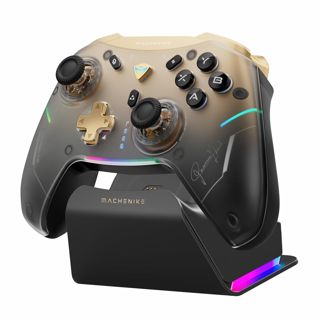
Machenike G5Pro Max Wireless Controller, 1000Hz, RGB, Charging Dock
$ 40.49
$ 74.99
 Image unavailable
$ 12.14 22.49
You save
Secure Checkout
Product description How to connect? Check Compatibility: Will It Work With Your Device? Tap to watch our Quick Pairing GuideAurora II 2.4G Wireless Bluetooth Controller for PC/Android/Switch/iOS/Switch 2/Steam DeckNot compatible with Xbox, PS5, PS4, Fire TV and GeForce NowHow to resolve the issue of incorrect Bluetooth names during connection?Check whether the wrong mode combination key was pressed during the connection process. -0:00 How to connect? Check Compatibility: Will It Work With Your Device? Tap to watch our Quick Pairing Guide Aurora II 2.4G Wireless Bluetooth Controller for PC/Android/Switch/iOS/Switch 2/Steam Deck Not compatible with Xbox, PS5, PS4, Fire TV and GeForce Now How to resolve the issue of incorrect Bluetooth names during connection?Check whether the wrong mode combination key was pressed during the connection process. Tap to watch our Quick Troubleshooting How to reset the controller? When encountering an unresponsive controller, we recommend first performing a controller reset, then reconnecting the device. -0:00 Tap to watch our Quick Troubleshooting How to reset the controller? When encountering an unresponsive controller, we recommend first performing a controller reset, then reconnecting the device. Tap to watch our Quick Troubleshooting How to restore factory settings? When encountering issues such as unresponsive buttons or startup failures, we recommend performing a factory reset and then reconnecting the device. -0:00 How to restore factory settings? When encountering issues such as unresponsive buttons or startup failures, we recommend performing a factory reset and then reconnecting the device. Tap to watch our Quick Troubleshooting How to Calibrate Joystick Triggers? When joysticks or triggers malfunction, we recommend calibrating the joystick and trigger, then reconnecting them according to the steps. -0:00 How to Calibrate Joystick Triggers? When joysticks or triggers malfunction, we recommend calibrating the joystick and trigger, then reconnecting them according to the steps. From the brand Elevate Your Gaming Experience with Top-Tier Controllers and Accessories At AceGamer, we're dedicated to enhancing your gaming journey. Specializing in high-quality controllers and 3C electronics for PS4, Switch, Switch2, PC and PS5, our products are crafted to deliver unmatched precision and comfort. Join us in taking your gaming to the next level. Elevate Your Gaming Experience with Top-Tier Controllers and Accessories At AceGamer, we're dedicated to enhancing your gaming journey. Specializing in high-quality controllers and 3C electronics for PS4, Switch, Switch2, PC and PS5, our products are crafted to deliver unmatched precision and comfort. Join us in taking your gaming to the next level. Pluto 2.4G Controller Visit the Store Pluto 2.4G Controller Visit the Store Aurora II 2.4G Controller Visit the Store Aurora II 2.4G Controller Pocket Controllers Mini bluetooth controller for Nintendo Switch/Switch 2/Android/iOS/PC/Steamdeck Pocket Controllers Mini bluetooth controller for Nintendo Switch/Switch 2/Android/iOS/PC/Steamdeck Portable Controller Visit the Store Portable Controller 🎮【Newly Enhanced】1、Upgraded receiver and encryption dongle for stronger, more stable connectivity. 2、Added support for host SW 2 connection. 3、Reduced Hall Stick drift for improved accuracy. 4、Fully upgraded key buttons for better performance. 🎮【Customizable Back Keys】The controller features 2 additional programmable buttons on the back, allowing you to customize trigger combos or any other features to enhance your gaming convenience and experience. There are also two back button switches for easy access. 🎮【Wireless Connection】The Gaming Controller adopts 2.4G wireless transmission technology, which has the characteristics of stable signal, strong anti-interference, long connection distance and delay elimination. The handle is plug and play, no additional drive required. Note: For 2.4G connection, you need to press and hold the “A” button first, then press and hold the “HOME” button for 3 seconds, it will start pairing with the receiver. For Bluetooth connection, press and hold the “HOME” button for 3 seconds. 🎮【Large Capacity Battery】Say goodbye to game interruptions.The AceGamer Aurora II controller is equipped with a 1000mAh upgraded battery, which provides an extra-long playtime on a single charge. With longer battery life, you can immerse yourself in games for longer without worrying about running out of power. 🎮【Multi-Platform Compatibility 】Our controller is designed to be compatible with various platforms, including PC Windows 7,Windows 10and later version, Switch, iOS, and Android. No matter which device you prefer for gaming, our controller provides seamless connectivity and smooth gameplay across multiple platforms, ensuring versatility and convenience.!Note!: The controller is not compatible with the Xbox system. 🎮【Hall Effect Joysticks】 Enjoy enhanced joystick control with our two Hall Effect sensors. These sensors provide precise and reliable input detection for smooth and accurate in-game movement. Whether you're navigating a virtual world or taking precise aim, our Hall Effect technology ensures a seamless gaming experience. 🎮【How to connect 】1. For 2.4G receiver connection, first press and hold the “A” button, then press and hold the ‘HOME’ button for 3 seconds to begin pairing with the receiver. For Bluetooth connection, press and hold the “HOME” button for 3 seconds. 2. Bluetooth connection: Press and hold the HOME button on the controller for approximately 3 seconds to initiate Bluetooth pairing. Enable Bluetooth search on your PC, then click to connect to “Xbox Wireless Controller.” Once Bluetooth pairing is successful, LED2 will illuminate. 🎮【Power-saving mode 】The Aurora II controller will automatically enter sleep mode after five minutes of inactivity. Press the Home button again to reconnect.
Gamepads & Standard Controllers
Gamepads & Standard Controllers
Gamepads & Standard Controllers
Gamepads & Standard Controllers