
−46%
Gamepads & Standard Controllers
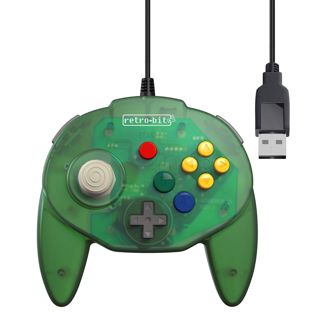
Retro-Bit Tribute 64 USB Controller for PC, Switch, Mac, Steam, RetroPie, Raspberry Pi - USB Port - (Forest Green)
$ 18.89
$ 34.99
 Image unavailable
$ 9.69 17.95
You save
Secure Checkout
Product description arVin Mobile Phone Controller for iPhone/Android Phone Compatible with iOS 13.0+ system, Phone conreoller for iPhone 17/iPhone 17 Air/iPhone 17 Pro/iPhone 17 Pro Max/iPhone 16/iPhone 16 Plus/iPhone 16 Pro/iPhone 16 Pro Max/iPhone 15/iPhone 15 Plus/iPhone 15 Pro/iPhone 15 Pro Max/ iPhone 14/14 Plus/14Pro/14 Pro Max/ iPhone 13/13 mini/13 Pro/13 Pro Max/iPhone 12/12 mini/12 Pro/12 Pro Max/iPhone 11/11 Pro/11 Pro Max/iPhone X/XR/XS/XS Max/8/8 Plus/7/7 Plus/6S/6S Plus; Compatible with iPad/iPad Mini/iPad Pro/iPad Air Compatible with Android 6.0+ system Android controller for Samsung Galaxy S25 Ultra/S25 +/S25 /S24 Ultra/S24 +/S24 /S23 Ultra/S23 +/S23 /S22 Ultra/ S22+ /S22/ Galaxy S21 Ultra / S21+/ S21/ Galaxy S20 Ultra/ S20+/ S20/ Galaxy S10e/ S10+/ S10/ Galaxy S9+/ S9/ Galaxy S8+/ S8, Galaxy Note, One Plus, TCL, Motorola, Huawei, oppo, vivo and more android phone. Compatible with Samsung Galaxy Tab S8 Ultra, Tab S7+, Tab Active 3, Tab S7 FE, Lenovo Yoga Tab 13, Tab 11, Tab P10. With an adjustable phone clip compatible with 4-6in phone, but the stand size does not support ipad. If you play with an iPad, you can put the ipad aside after the connection is successful. Not for Apple TV/iPod/Fire TV/TV Box/PC Triggers Linear trigger, precise control, quick response to attack the enemy. 360° Joysticks 360° full-area positioning, high precision, comfortable touch, non-slip design, effectively prevent fingers from slipping off during intense battles. A/B/X/Y Function Keys The strength and layout of the buttons are carefully debugged to meet the player's comfort and button habits when using the controller. Detachable Cross Key Cap The integrated design of conjoined keys and split keys improves accuracy and fully meets the habits of various players. Supports Most Controller Games You can download the supported controller games on App Store/Arcade/Google Play. Not for PUBG In COD gaming interface, if you’ve received a notice to choose a controller model within ‘PS4,PS5 and XBOX’. Please select ‘XBOX’ Best Gift arVin phone controller for iOS/Android is the best gift for Christmas, Valentine's Day, Thanksgiving, birthday, give your family and friends so they can enjoy the game with you. What will you get? 1x Wireless Controller for iOS & Android 1x Detachable Phone Clip 1x Charging cable; 1x Manual Wireless Connection Android has 2 boot modes ("X+ Home" or "R1+ Home") for different games, if you find supported games can't work on this controller, please switch the boot mode. Why controller doesn’t work after connection. Please remove and delete bluetooth connection then reconnect it again, or reset the controller. Why controller doesn’t work after connection. Please remove and delete bluetooth connection then reconnect it again, or reset the controller. Why can't I play CODM, the buttons don't respond. If the controller is connected but ‘Call of Duty Mobile’ doesn't work, please back to game Home Page, then close the game. forget the connected Bluetooth 'Xbox Wireless Controller' on your phone and reconnect it, then enter ‘CODM’ again Why can't I play CODM, the buttons don't respond. If the controller is connected but ‘Call of Duty Mobile’ doesn't work, please back to game Home Page, then close the game. forget the connected Bluetooth 'Xbox Wireless Controller' on your phone and reconnect it, then enter ‘CODM’ again I can’t reconnect my phone with gamepad again even the Bluetooth shows has connected. If you connect the controller with other devices (eg. Galaxy S20) before reconnecting the previous device (eg. iPhone 13), please delete the Bluetooth of the controller on the previous device (eg. iPhone 13), then search again and reconnect I can’t reconnect my phone with gamepad again even the Bluetooth shows has connected. If you connect the controller with other devices (eg. Galaxy S20) before reconnecting the previous device (eg. iPhone 13), please delete the Bluetooth of the controller on the previous device (eg. iPhone 13), then search again and reconnect How do I know if the gamepad is fully charged? When the gamepad is charged, LED 4 flashes slowly and LED 4 will be keeps on if fully charged How do I know if the gamepad is fully charged? When the gamepad is charged, LED 4 flashes slowly and LED 4 will be keeps on if fully charged How to reset default setting for the gamepad? There is a ‘Reset’ hole on the back of gamepad, beside L2 button. When gamepad is turned on, press the reset button, LED light will turn off after reset. How to reset default setting for the gamepad? There is a ‘Reset’ hole on the back of gamepad, beside L2 button. When gamepad is turned on, press the reset button, LED light will turn off after reset. arVin Wireless Gaming Controller for iOS Android PC Mobile Phone Controller Phone Game Controller Controller for iPhone 17 Controller for iPad Android Controller Gamepad for iPhone 17 From the brand Give You New Game Experience Our controller is the best gift for Christmas, Thanksgiving, Birthday to your family, friends, so that they can enjoy the game with you Designed for the Best Comfort and Gaming ExperienceOur mission is to bring unforgettable gaming experience and enhance the fun of gaming for players of all levels. Designed for the Best Comfort and Gaming Experience Our mission is to bring unforgettable gaming experience and enhance the fun of gaming for players of all levels. USB C Controller for iPhone 17 USB C Mobile Gaming Controller for Android & iPhone 17/16/15 Series (USB-C) USB C Controller for iPhone 17 USB C Mobile Gaming Controller for Android & iPhone 17/16/15 Series (USB-C) USB C Controller for iPad USB C Mobile Gaming Controller for Tablet & iPad 6.7-11inch (USB-C) USB C Controller for iPad USB C Mobile Gaming Controller for Tablet & iPad 6.7-11inch (USB-C) USB C Mobile Gaming Controller Visit the Store USB C Mobile Gaming Controller Visit the Store iPad Gaming Controller Visit the Store iPad Gaming Controller iPhone Gaming Controller Visit the Store iPhone Gaming Controller Android Game Controller Visit the Store Android Game Controller keyboard and Mouse Converter Visit the Store keyboard and Mouse Converter Phone Controller for iPhone Visit the Store Phone Controller for iPhone Arcade Fight Joystick Visit the Store Arcade Fight Joystick 【COMPATIBLE WITH IOS & ANDROID 】 Mfi controller compatible with ios 13.4+ & Android 6.0 + System. With adjustable phone clip for 4-6in iPhone 15/15 Plus/15 Pro/15 Pro Max/14/14 Plus/14 Pro /14 Pro Max/13/13 mini/13 Pro/13 Pro Max/12/12 mini/12 Pro/12 Pro Max/11/11 Pro/11 Pro Max/X/XR/XS/XS Max; Galaxy S24 Ultra series S23 Ultra series/ S22 Ultra series/ S20 Ultra series/ S10 series/S9 series/S8 series, One Plus, TCL, Motorla and more android phones (Not for Apple TV/iPod//Fire TV/TV Box/PC) 【DIRECT PLAY】The phone controller no simulator needed. Using wireless Bluetooth protocol 5.0, Wireless range up to 32.8 feet. Connect Bluetooth for direct playback 【LOWEST LATENCY & PRECISE CONTROL】The bluetooth game controller with 360° high-precision joystick, precise positioning and smooth movement, you can quickly target enemies in the game and Improve your gaming experience. 【SUPPORT MOST MFI AND CLOUD GAMING】You can download your favorite games in App Store/Arcade/Google Play. Supports most Action/Racing/Fighting/Shooting/Athletics games. Work with Apex Legends Mobile, Genshin Impact, Call of Duty Mobile (COD), Combat Modern 5 and Asphalt 9 Legends and more mfi games. (Not for PUBG & Fotnite) 【LONG PLAY TIME】The android controller built-in rechargeable 400mAh battery, Up to 18 hours of playtime on a full charge, designed for long gaming sessions. 【WHAT YOU GET?】1x Mobile Game controller, 1x charging cable, 1x user manual, and friendly customer service. If you have any questions, please feel free to contact us.
Gamepads & Standard Controllers
Gamepads & Standard Controllers
Gamepads & Standard Controllers
Gamepads & Standard Controllers