Product details
Product description
PRODUCT SPECIFICATION
More Choices for HE Series
X68 HE Black
X68 HE White Contour
X68 HE Black Contour
X68 HE Moonlight
X60 HE Black Red
X60 HE Moonlight
X68MAX White Contour
How to restore the keyboard to factory settings? Press and hold the key combination "FN+Caps Lock" for 3 seconds to restore the keyboard to factory settings
How to restore the keyboard to factory settings?
Press and hold the key combination "FN+Caps Lock" for 3 seconds to restore the keyboard to factory settings
Key combination for adjusting the keyboard light (can also be adjusted in the software) FN+\|: Switch Light Mode FN+Enter: Switch Light Color FN+Backspace: Light On/Off FN+Tab: All key lights turn white
Key combination for adjusting the keyboard light (can also be adjusted in the software)
FN+\|: Switch Light Mode
FN+Enter: Switch Light Color
FN+Backspace: Light On/Off
FN+Tab: All key lights turn white
Is the X68 HE automatically on 8k polling or is there somewhere to set it? The X68 HE is set to 8k polling rate by default, so you don’t need to make any adjustments
Is the X68 HE automatically on 8k polling or is there somewhere to set it?
The X68 HE is set to 8k polling rate by default, so you don’t need to make any adjustments
Do I need to calibrate the keyboard before using it? We recommend running a quick calibration before first use. This helps the keyboard detect keystrokes more accurately and ensures the best typing experience.
Do I need to calibrate the keyboard before using it?
We recommend running a quick calibration before first use. This helps the keyboard detect keystrokes more accurately and ensures the best typing experience.
How do I switch between the F-keys (F1–F12) and the number keys on the top row? You can toggle between them by pressing FN + Right Shift. This allows you to choose whether the top row functions as number keys or as F-keys, depending on your needs.
How do I switch between the F-keys (F1–F12) and the number keys on the top row?
You can toggle between them by pressing FN + Right Shift. This allows you to choose whether the top row functions as number keys or as F-keys, depending on your needs.
From the brand
About ATTACK SHARK The logo of ATTACK SHARK is a shark. Shark is the overlord of the sea, a natural hunter, and dominates the game world. ATTACK SHARK is a gaming peripherals brand focusing on the high-end market. We are committed to providing professional e-sports gaming mice, customized keyboards and accessories to gamers.
About ATTACK SHARK
The logo of ATTACK SHARK is a shark. Shark is the overlord of the sea, a natural hunter, and dominates the game world.
ATTACK SHARK is a gaming peripherals brand focusing on the high-end market. We are committed to providing professional e-sports gaming mice, customized keyboards and accessories to gamers.
V2 AIR Ultralight Gaming Mouse Visit the Store
V2 AIR Ultralight Gaming Mouse
Visit the Store
X11 ULTRA Gaming Mouse Visit the Store
X11 ULTRA Gaming Mouse
Custom RGB Coiled Cable Visit the Store
Custom RGB Coiled Cable
SK Series Keycaps Set Visit the Store
SK Series Keycaps Set
Ultralight Gaming Mouse Visit the Store
Ultralight Gaming Mouse
RT Mechanical Keyboard Visit the Store
RT Mechanical Keyboard
RT Keyboard and Tri Mode Mouse Visit the Store
RT Keyboard and Tri Mode Mouse
Tri Mode Mechanical Keyboard Visit the Store
Tri Mode Mechanical Keyboard
Wired RT Keyboard X68 HE Visit the Store
Wired RT Keyboard X68 HE
Alice Layout Gaming Keyboard Visit the Store
Alice Layout Gaming Keyboard
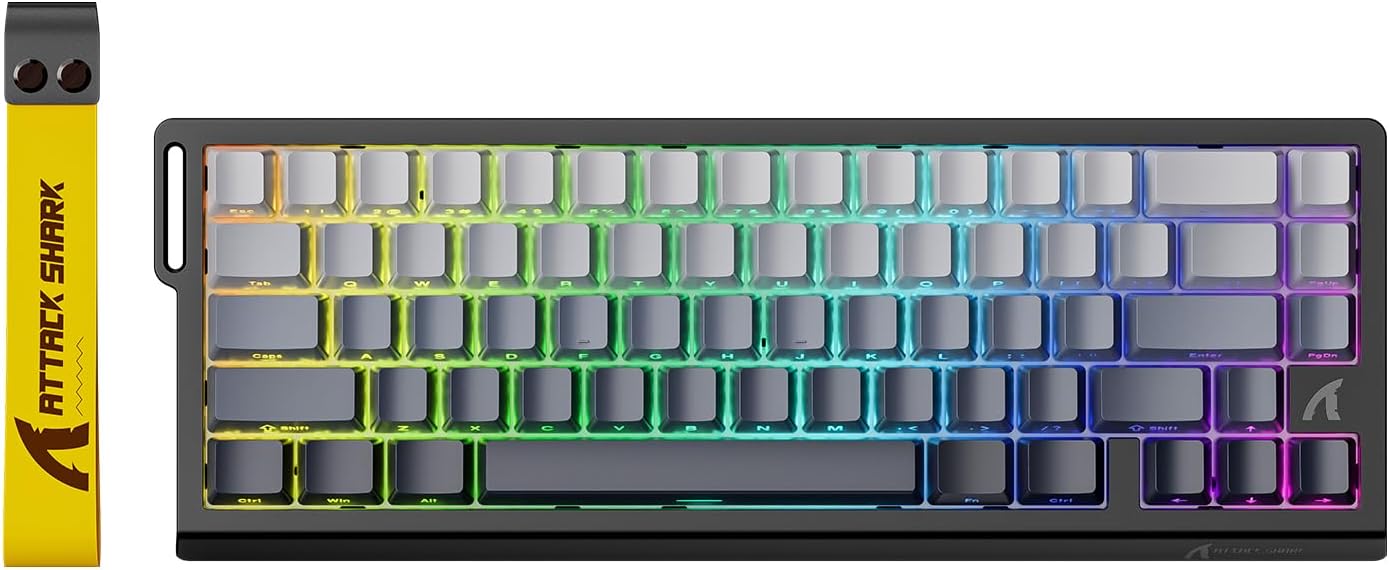
【60% Percent Layout Magnetic Switch Keyboard with RT Function】Equipped with adjustable hall effect magnetic switches, featured with customizable dynamic keystroke and rapid trigger function, this ATTACK SHARK X68HE keyboard allow you bind 4 functions according to 4 different pressing degrees to one key, adjust keystroke actuation point from a light 0.1mm to a strong 3.4mm, true 8000Hz polling rates, 0.01mm RT accuracy, effectively reducing keyboard latency to an impressive 0.125ms(theoretical value), ensure flexibility and ultra-response, perfect for FPS and rhythm game like Valorant, osu
【Programmable NKRO ANSI Keyboard】Web driver link: qmk.top, no need to install, you can use it to remap key function, set macro and hot keys, adjust light mode and DIY your own light effect, apply desired function to the key you want, and choose or customize keystroke activate or deactivate actuation point for your typing or gaming need, minimize latency, provide a revolutionary full control of fast and ultra-accurate keystroke, always gets pre-acted in the game, design for win
【Top Mount&HiFI Typing Sound】This wired mechanical keyboard adopts top-mounted structure for a quiet, stable and smooth typing operation, built with aluminum alloy anodizing process positioning plate and double layer PORON, enhances your gaming efficiency with satisfying keystroke feeling, making it one of the fastest gaming keyboards available, in addition, using fine tuned stabilizer pre-lubed satelite switches to ensure a smoother typing experience with less wobbliness on the big keys
【Light Up Keyboard with PBT Keycaps】Adopt premier built-in RGB LED lamp with rich spectrum of 16.8 million colors, this X68HE keyboard can offer multiple backlit mode and light color to shine your world, wear with solid pure color theme Cherry profile double shot PBT keycaps, more durable with clear letter, always attractive. South-facing LEDs ensure superior shine-through capabilities for an immersive experience
【Ergonomic Design& Wide Compatibility】This type-c wired gaming keyboard is crafted with scientific structure with compact 66 key and curved wrist rest, retains separate arrow keys, has non-slip mat for stable using, support full key anti-ghosting and FN key combination function, can compatible with pc mac laptop, support dual system switchable between Win and Mac by one button, attached with detachable unique streamer, very useful for more efficient work and gaming, provides precise control tailored to your playstyle, particularly beneficial in fast-paced games like FPS and RTS games