
−46%

Joysticks
XD2-PA24 Joystick Controllers, Monolever Joystick Controllers, XD2PA24CR Spring Return Momentary Joy Stick, Momentary Joy Stick Switch Replacement
$ 8.36
$ 15.49
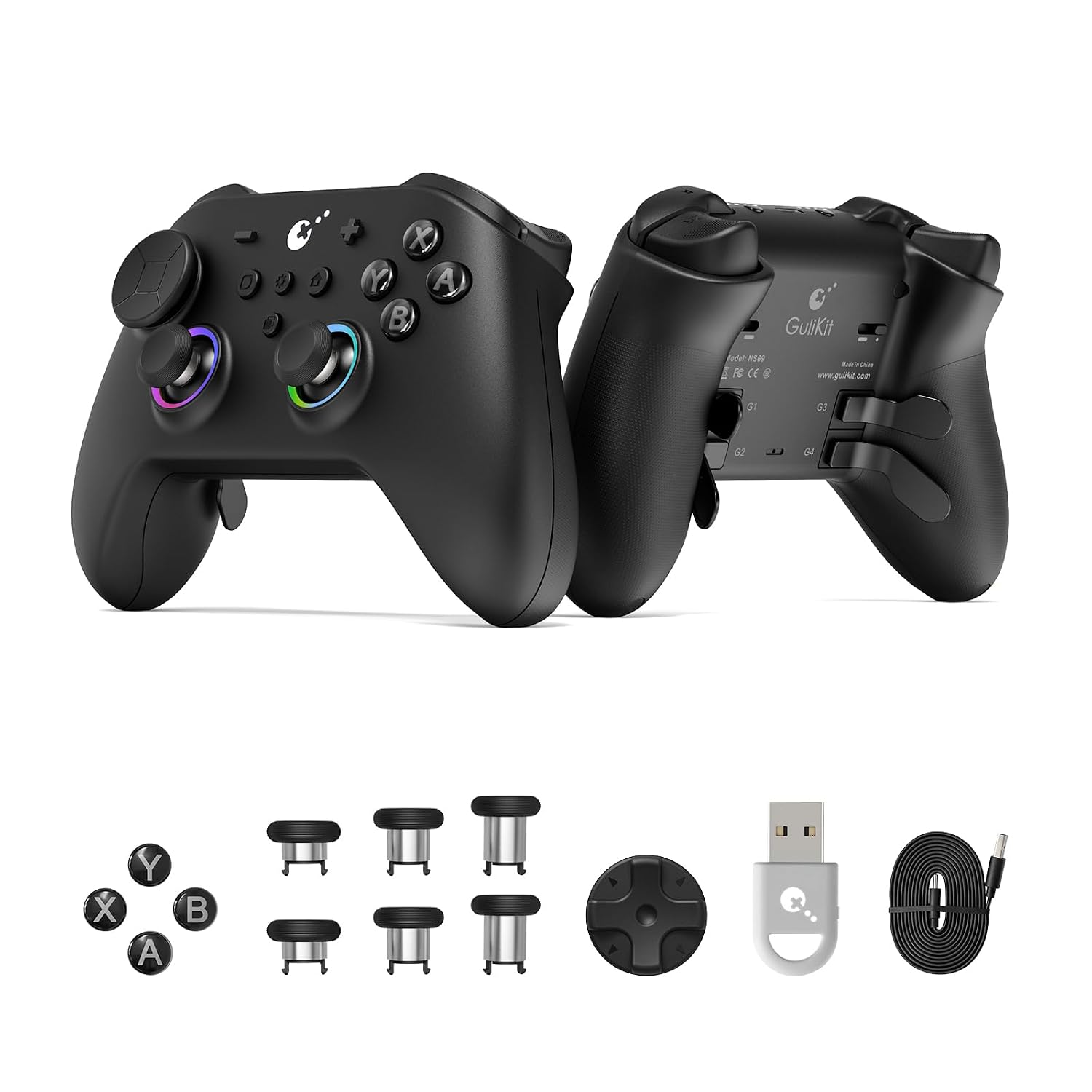 Image unavailable
$ 37.79 69.99
You save
Secure Checkout
Product description How do I update the TT MAX firmware correctly? 1. Use a Windows PC to update the firmware. 2. Extract the firmware files before updating. 3. Update both MCUs separately — The Main MCU and Bluetooth MCU require different update procedures. How do I update the TT MAX firmware correctly? 1. Use a Windows PC to update the firmware. 2. Extract the firmware files before updating. 3. Update both MCUs separately — The Main MCU and Bluetooth MCU require different update procedures. Why can’t my TT MAX wake up Switch 2? Switch 2 wake-up requires a specific pairing method and won’t work with standard pairing. Follow the Switch 2 pairing instructions to enable the wake-up feature. Why can’t my TT MAX wake up Switch 2? Switch 2 wake-up requires a specific pairing method and won’t work with standard pairing. Follow the Switch 2 pairing instructions to enable the wake-up feature. Does TT MAX support for Xbox or PS5? No. TT MAX does not support for Xbox or PS consoles. It supports Switch 1/2, Windows PC, Android, and iOS. Does TT MAX support for Xbox or PS5? No. TT MAX does not support for Xbox or PS consoles. It supports Switch 1/2, Windows PC, Android, and iOS. How do I adjust the joystick tension from 30–90 gf? 1.Remove the joystick cap. 2.Use the included wrench to adjust the tension. 3.Find the + / – markings. Turn toward + for more tension or – for less. 4.Note: Avoid over-loosening the adjustment screw. How do I adjust the joystick tension from 30–90 gf? 1.Remove the joystick cap. 2.Use the included wrench to adjust the tension. 3.Find the + / – markings. Turn toward + for more tension or – for less. 4.Note: Avoid over-loosening the adjustment screw. Can I use the included PC05 adapter if my PC doesn’t have Bluetooth? Yes. You can use the included PC05 adapter even if your PC doesn't have Bluetooth. Can I use the included PC05 adapter if my PC doesn’t have Bluetooth? Yes. You can use the included PC05 adapter even if your PC doesn't have Bluetooth. From the brand Latest Products Visit the Store Latest Products Visit the Store Tri-mode Gaming Controllers Visit the Store Tri-mode Gaming Controllers Magnetic Joystick for Handheld Visit the Store Magnetic Joystick for Handheld TMR Joystick for Controllers Visit the Store TMR Joystick for Controllers Adapters,Docks & Accessories Visit the Store Adapters,Docks & Accessories Tension-Adjustable TMR Joysticks: 720° stepless TMR joysticks with hidden adjustment mechanism. Fine-tune resistance for personalized control, with anti-drift design and up to 4000-level precision for comfortable, natural gameplay. Ultra-Fast Wireless Speed: GuliKit "Hyperlink 2" next-gen Bluetooth delivers 2.62ms ultra-low latency on PC —ensuring smooth, lag-free gameplay. Multi-Platform Compatibility: Works with Switch, Switch 2, Windows PC, Android, and iOS. Supports wired & Bluetooth connections and Switch 1/2 wake-up. Note: Not compatible with Xbox or PS consoles. Smart 2-in-1 Triggers: Switchable Hall effect & microswitch triggers for precise control in every gaming scenario — perfect for shooters, racers, and action games. Immersive Magnetic Levitation Vibration: HD, Super Haptic, and Rotor vibration modes with adjustable intensity deliver full sensory feedback on all supported platforms. Rich Customization Accessories: Includes 4 removable metal back paddles, 2 sets of Switch & PC keycaps, 3 stickcap heights, 2 interchangeable D-Pads, protective case, data cable, and Hyperlink 2 multifunction Bluetooth adapter compatible with Xbox Series S/X, Elite Series 2, PS4/PS5, Switch Pro, and Xbox One controllers across Switch 1/2, Windows, SteamOS, and Android. Pro-Level Gaming Features: Gyro motion on Switch, motion aiming on PC, APG 10-min recording & auto playback, anti-snapback settings, RGB lighting, adjustable joystick sensitivity & deadzone, 4/8-way D-Pad swap, and large 950mAh battery for extended gaming sessions. Note: When you need to update to the latest firmware V7.7, please also update the Bluetooth firmware to V02 (included in the TT firmware zip package). Detailed update instructions for both are available in the web-based upgrade guide.
Joysticks
Racing Wheels
Joysticks
Racing Wheels