
−46%
Gamepads & Standard Controllers
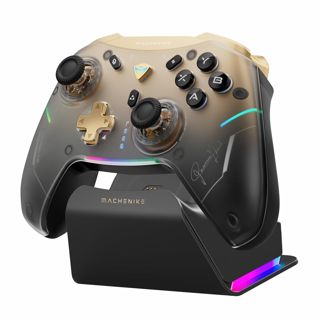
Machenike G5Pro Max Wireless Controller, 1000Hz, RGB, Charging Dock
$ 40.49
$ 74.99
 Image unavailable
$ 9.56 17.71
You save
Secure Checkout
Support operating system ★Windows 32/64 bit & Mac OS System,PC running operating system:Windows 98/2000/ ME/XP/Vista/Win7/8/8.1/11 or later ★Mac running OS X 10.0/Mac OS X or above ★Linux running operating system:RedHat/SUSE/Debian/Ubuntu/Gentoo etc. Supported game device with usb port: PC Computer, Notebook/Laptop Computer,MacBook Raspberry Pi ,Raspberry Pi 1 Model B, Model A, Raspberry Pi 1 Model B+, Raspberry Pi 2,Raspberry Pi OS, Raspberry Pi 3 Model B+, Raspberry Pi 3. Notice: When using it on the Raspberry Pi 3, prefer the retro game-specific system RetroPie. How to use the controller and install an emulator on Mac 1)Download the emulator what you like, such as "OpenEmu". 2) Plug USB controller to connect with your computer, scan it and recognize controllers.3)Redefine USB controller' buttons ( D-pad、SELECT、START、B、A、X、Y button -- define)- confirm, please map the d-pad keys one by one. 4)Open the emulator and play these Retro SNES games. Matters needing attention: - Supported Game Emulator: OpenEmu(MAC),SNES, Snes9x, ZSNES, Higan, Handheld GBA emulator,RetroArch,Sega Genesis emulator etc. . - NOT Compatible with Android TV Box,not for iPad, third Mini Games Box and Tesla Model 3 The first time you start "Retro", you will be asked to configure your controller. Please set up the button of usb controllers according to the steps. Open Emulator-Option-Controller-Controller Settings (Select Default Setup base) Map usb controller' buttons ( D-pad、SELECT、START、B、A、X、Y button -- define)- confirm Choose Emulator Rom file( game) -START-Play computer games Features: ①. These buttons have a good spring to them,are reliable and responsive②. It works well with your SNES game and retro games③. The controller is packed in the colorfu box,it is very ideal gift for your friends and family Package included: 2* SNES USB controllers ✅【Compatibility】Compatible with Windows PC, Linux ,Mac, Raspberry Pi(Retropie system). Specifically designed for playing classic old school retro snes games on computer or laptop.This is the USB controller what has a wired plug for PC, NOT compatible for Super Nintendo Entertainment System(SNES machine) ✅ 【Ergonomic Design】Super precise cross key and function buttons,the cross direction key adopts frosted concave design,anti-sweat and anti-slip.The shape of the controller is designed to fit the contour of your hands,easy and comfortable to hold. ✅ 【Advanced Game Experience】PC running operating system:Windows 98/2000/ ME/XP/Vista/Win7/8/8.1/10/11 or later,or Mac running OS X 10.0/Mac OS X or above.It works with most of emulators you wish to download and use,such as VirtuaNES(PC),sens9x,Zsens,sensgt,Uosnesw,RetroArch,OpenEmu(MAC),NESEmu and Jnes etc. ✅ 【Wired USB Connection】Standard USB 2.0 port with a 1.5 meters (5ft) cable, don't need to install any drivers, you must manually set the buttons and directionals within the emulator you're using, and the controller not automatically assigns buttons/directional axes. Notice: please download the game emulator first before start the games, you can download the emulator “VirtuaNES” on PC and “OpenEmu”on MAC. ✅【Satisfaction】Third party controller(USB Version), not for original SNES console and not support for switch. If there is an incompatibility on MAC or Raspberry Pi , please contact the seller for a support.
Gamepads & Standard Controllers
Gamepads & Standard Controllers
Gamepads & Standard Controllers
Gamepads & Standard Controllers