
−46%
Enclosures
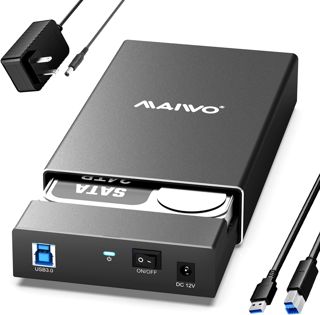
MAIWO 2.5''/3.5'' Hard Drive Enclosure for SATA HDD/SSD with ON/Off Switch
$ 10.25
$ 18.99
 Image unavailable
$ 16.19 29.99
You save
Secure Checkout
Product description USB to M.2/SATA/IDE 3-IN-1 Adapter for SSD HDD & NVMe M.2 SSD with Power Supply The M.2 NVME to SATA IDE Adapter provides a quick and convenient way to access your 2.5, 3.5-inch SATA SSD/HDD, 3.5inch IDE HDD or M.2 NVMe SSD through a single USB-C port, this ultra-portable adapter lets you instantly connect drives for data migration, backup, or duplication Universal Hard Drive Reader Compatible with M.2 SSD SATA SSD HDD, 3.5 IDE HDD This NVMe M.2 SSD Enclosure Adapter Easy-access Design Compatible with all M.2 PCIe NVMe SSDs and 2.5”/3.5” SATA SSDs/HDDs and 3.5" IDE HDDS, making it ideal for new installations, upgrades, backups, gaming, and movie streaming USB 3.2 Gen 2 standard port supporting data transfer rates of up to 10 Gbps High-Speed Data Transfers Experience superior performance with transfer speeds up to 1000MB/s when paired with an M.2 NVMe SSD and a USB 3.2 Gen 2 host system. For 3.5" IDE or SATA SSD/HDD, users can achieve up to 600MB/s. Packaging List: 1xNVMe and 2.5''/3.5'' SATA IDE to USB Hard Drive Reader Adapter ; 1x USB A to C cable, 1x C to C Adapter, 1x 12V/2A Power Adapter; 1× 4PIN power cable; 1x user manual. Open-air design allows drives, M.2 SSDs to be fully exposed for heat dissipation Open-frame architecture exposes M.2 drives to ambient airflow, ensuring efficient heat dissipation during extended data transfers. This design helps maintain optimal performance The bottom of this external hard drive enclosure features a non-slip silicone gasket to secure the enclosure on desktop Simple Connection Steps To set up the M.2 NVMe & SATA&IDE External Adapter, insert your M.2 NVMe or SATA SSD/HDD or IDE drive into the slot at a slight angle, connect the dock to your computer via a USB-C/A cable, and turn on the power. Why My Hard Drive Not Showing Up or Detected in Computer with the adapter 1) New Drive Initialization: If you are using a brand-new SSD or HDD, you must initialize it first, then create a new partition and format it. 2) Please confirm whether the hard drive itself is still functional and undamaged. 3) If you are using an Mac system, ensure the hard drive is formatted in a file system that macOS can read and write (such as exFAT or APFS). 4) Incorrect Hard Drive Type: This adapter does not support SAS or SCSI hard drives. 5) Damaged USB Port: Try plugging the cable into a different port. 6) External Power Required (for 3.5" Drives): Important: 3.5-inch hard drives require an external power adapter to function 7) LED Indicator Status: The LED indicator light will only turn on after both the hard drive is securely connected 8) USB Port Preference: If you are using a desktop computer, please use the rear USB ports on the back of the computer chassis for a more stable power supply 9) This device can only read one hard disk at a time, if it is plugged into both M.2 NVMe/M.2 SATA and SATA interface, it will only read the hard disk of SATA interface Access and manage M.2 NVMe and SATA&IDE SSDs/HDDs: This 3-in-1 Hard Drive Reader supports a wide range of SSDs and HDDs, fitting M.2 (M Key & B+M Key) formats, as well as 2.5/3.5 SATA and 3.5 IDE drives for convenient access to fast data transfer, recovery, and upgrades 10Gbps M.2 SSD Enclosure: The Adapter supports up to 700 MB/s write speeds over M.2 NVMe, and up to 5 Gbps over SATA/IDE when connected to legacy 2.5in or 3.5in SATA/IDE drives. Please note that M.2 SATA drives are not supported Versatile Solution for IT Professionals: This hard drive reader is a versatile solution for IT professionals performing backups, disk imaging, or maintenance on M.2 NVMe and legacy SATA drives with external drive access over USB-C and USB-A connectivity Stable Power Supply: It runs on USB bus power for a single 2.5 in SATA, IDE or M.2 NVMe drive, and includes a universal power adapter required for 3.5 in SATA/IDE drives, for connecting two drives at once, or when a single drive draws more power than USB can provide Heat Dissipation & Non-Slip Design: The open-top M.2 slot maintains airflow for consistent performance during sustained workloads for heat dissipation. The bottom of this external hard drive enclosure features a non-slip silicone gasket to secure the M.2 NVMe SSD enclosure on desktop Plug-and-Play Tool-Free Installation: The device features straightforward installation that requires no tools and is immediately recognized by your operating system including Windows, macOS, and Linux systems for quick and easy setup Multiple Drive Size Compatibility: The M.2 slots accommodate various SSD lengths including 2230, 2242, 2260, 2280, and 22110 sizes, supporting both PCIe NVMe (M Key/B+M Key) protocols for flexible storage solutions
Enclosures
Enclosures
Enclosures
Enclosures