Product details
Product description
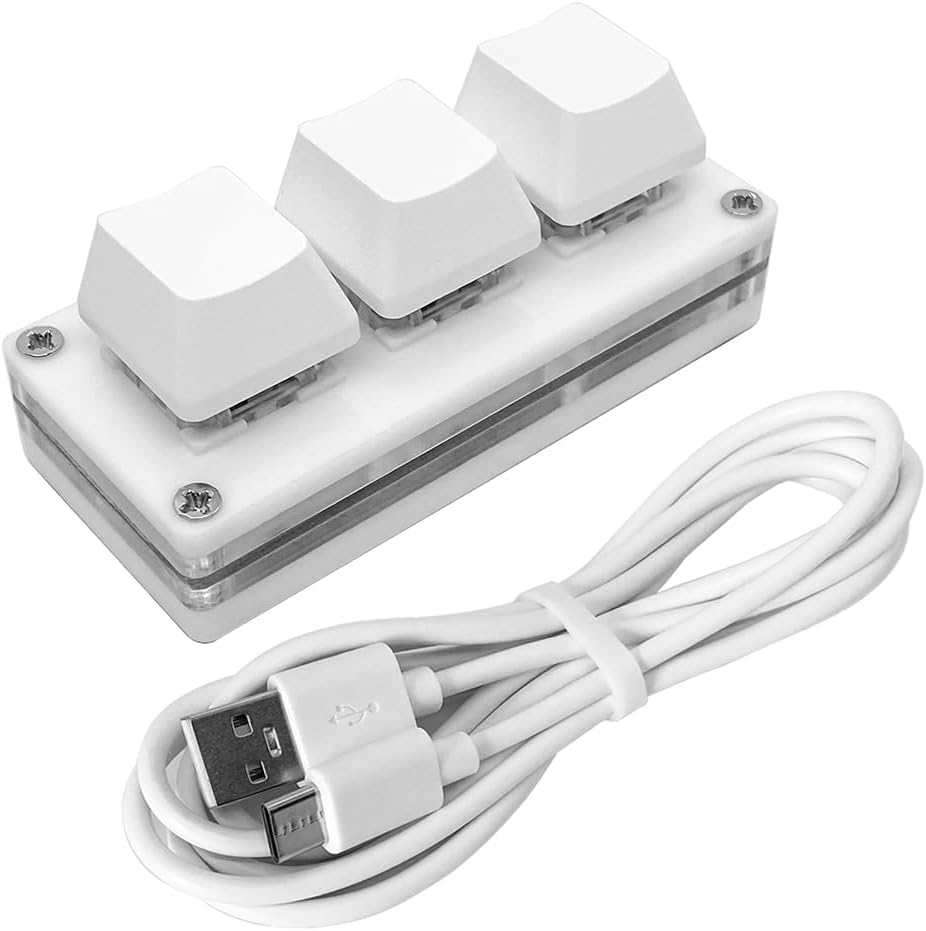
Package Includes: 1x Mini Keyboard, 1x 4.92ft Type-C USB Cable
Cherry MX Switches
Cherry MX Switches for Mechanical Keyboards and OUTEMU Mechanical Keyboards.
Red Switch Suitable groups: Game players
Mechanical touch: linear, soft tactile, click tactile
Key sound: the sound slightly
Pressure grams: 60 Click life 50 million operations
Trigger travel: 2 mm.
Removable Data line
With 4.92ft standard Type-C to USB data cable, The date line could be removed.
Non-slip Mat
Comes with 4x 8mm small paste non-slip pads, which can be attached to the four corners of the keyboard to prevent the keyboard from sliding back and forth when in use.
keyboard Mode: you can set the key combination/general key on the keyboard; you also can set as Game Controller buttons, used as shortcut keys for games with complex operations (Need the game to support "game controller").
Mouse Mode: you can manipulate cursor movement, mouse click, etc.(start with the current position of the mouse)
Mouse buttons: Operate the mouse buttons, left button, right button and middle button.
X axis: the horizontal axis of the cursor, Value range: 1-128 move to the right,128-255 move to the left.
Y axis: the longitudinal axis of the cursor, Value range: 1-128 move to the up, 128-255 move to the down.
Scroll wheel: Value range: 1-128 go up, 128-255 go down.
Multimedia Mode: you can control playback, pause, cut song, adjust volume, etc. You can also open my computer, player, calculator, browser, email, etc. with one key.
Multi-key Mode: you can press a button to automatically enter the preset password (One-key Password).
The password supports ASCII characters such as letters, numbers, matches and spaces. Up to 15 keys are supported.
LED Mode: you can use to specify the on/off and press action display mode of the keyboard LED. eg. Water mode, table lamp, press display color etc.
Operation steps 1. Connect the USB cable to this plug & play keyboard to your PC; 2. Basically all computer systems will recognize the executable file ".exe" as a virus, in fact it is not, no viruses. Please close the PC protection software; 3. Download the product manual (on the product details page), or download the configuration software in the eighth picture. After extracting the file, open the ". exe" file to start configuring. 4. If you need to set it in MAC, please set it in Windows before you can use it on Mac.
Type-C to USB interface, HID standard keyboard, plug and play without driver. The colorful led backlight can be individually adjusted on/off and key press action display mode. Default is irradiation mode: constantly bright and slowly changing color.
This macro pad keyboard supports multiple function modes, each button can be set to a different function mode without affecting each other. Four modes: keyboard, mouse, multimedia, multi-key mode.
The button function can be set by oneself, there is a special setting program, and the setting can be repeated. and Onboard storage, the settings are saved in the keyboard, and there is no need to set again when changing the device. [Tips: If the USB is inserted into the PC, but the keyboard indicator light is not on, please unplug the USB, reinsert it, and try several times. (Sometimes the PC lacks the necessary system patches, it is recommended to change another PC to set)]
Supports Windows, Linux, Mac OS, Android, RaspberryPi, etc. The mini keyboard body includes a Hot-swappable shaft, keycaps, non-slip pads, one 1.5m micro-USB cable. Default shaft body is Red Switches. If you need to set it in MAC, please set it in Windows before you can use it on Mac.