Product details
Product description
A little care goes a long way for your earbuds.
Wipe charging pins gently to avoid bad charging connection.
Charge them regularly even when not in use.
If left unused long, the display may not light in 10+ mins on charge, just keep it connected.
From the brand
If order past return window Your satisfaction is our priority. We offer ongoing product support and will always take responsibility for every purchase. Amazon’s official return window applies to all orders. Even after this window closes, we are still here to offer product support for any issues with your item. Please reach out to us via **Get product support** on your order page, and we will assist you to find a proper solution.
If order past return window
Your satisfaction is our priority.
We offer ongoing product support and will always take responsibility for every purchase.
Amazon’s official return window applies to all orders. Even after this window closes, we are still here to offer product support for any issues with your item. Please reach out to us via **Get product support** on your order page, and we will assist you to find a proper solution.
Hi Chris We hear your voice. We will restore the logo inside the circle on the charging case in future production batches. Best Regards, occiam
Hi Chris
We hear your voice. We will restore the logo inside the circle on the charging case in future production batches.
Best Regards,
occiam
Q1:My earbuds won't charge any more Plug power into the case — check the case itself charges and has enough battery. Wipe the earbud contacts and the case pins with a dry cotton swab — no dust or grime. Seat the earbuds properly and close the lid fully — our case uses a Hall-effect lid sensor, so they won't charge with the lid open. If they're charging normally, the case LED lights flash from the 1st grid to the 4th grid repeatedly. Q2:Still not charging? Get product support on your order page and we'll help you solve the problem in further.
Q1:My earbuds won't charge any more
Plug power into the case — check the case itself charges and has enough battery.
Wipe the earbud contacts and the case pins with a dry cotton swab — no dust or grime.
Seat the earbuds properly and close the lid fully — our case uses a Hall-effect lid sensor, so they won't charge with the lid open.
If they're charging normally, the case LED lights flash from the 1st grid to the 4th grid repeatedly.
Q2:Still not charging?
Get product support on your order page and we'll help you solve the problem in further.
Q3:The sound quality is poor when playing music. First, check your audio mode. Both ANC and transparency mode may make vocals and cymbals sound harsh for music. Press the button to switch to normal playback mode and replay your track. And then? Ensure earbuds fit snugly in ears — improper placement hurts low-frequency performance. Clear Bluetooth pairing history and re-pair; unstable connection causes distorted or muffled audio. Set your phone’s equalizer to balanced mode, avoid long-time max-volume playback. If issues remain, contact support with your order details for a proper solution.
Q3:The sound quality is poor when playing music.
First, check your audio mode. Both ANC and transparency mode may make vocals and cymbals sound harsh for music. Press the button to switch to normal playback mode and replay your track.
And then?
Ensure earbuds fit snugly in ears — improper placement hurts low-frequency performance.
Clear Bluetooth pairing history and re-pair; unstable connection causes distorted or muffled audio.
Set your phone’s equalizer to balanced mode, avoid long-time max-volume playback. If issues remain, contact support with your order details for a proper solution.
Q4: Siri doesn't work with my earbuds — how do I activate it? Siri is activated from the earbuds themselves: triple-tap the touch area of the Right earbud — or of the earbud you're wearing in single-earbud mode — and your phone will wake Siri. If you'd rather use the "Hey Siri" wake word instead (for example with the phone locked in your pocket while you're running), set "Say 'Hey Siri'" to "Always" in Settings › Siri & Search. Q5: How to cycle through the 3 sound modes? In dual-earbud mode, triple-tap left earbud to cycle Normal, ANC, Transparency modes. Single-earbud mode does not support ANC.
Q4: Siri doesn't work with my earbuds — how do I activate it?
Siri is activated from the earbuds themselves: triple-tap the touch area of the Right earbud — or of the earbud you're wearing in single-earbud mode — and your phone will wake Siri.
If you'd rather use the "Hey Siri" wake word instead (for example with the phone locked in your pocket while you're running), set "Say 'Hey Siri'" to "Always" in Settings › Siri & Search.
Q5: How to cycle through the 3 sound modes?
In dual-earbud mode, triple-tap left earbud to cycle Normal, ANC, Transparency modes. Single-earbud mode does not support ANC.
Q6:What if the sound quality is still bad after switching to regular modes? Check if the ear tips fit tightly to seal your ear. Extra S/L tips are included (M tips come pre-installed). Bluetooth can also be interfered by electronics like TVs or microwaves. Try resetting the earbuds. If issues persist, click "Get product support" on your order page, we'll follow up. Q7:When should I reset? When only one side plays music. When you can' t use both earbuds together. When both earbuds fail to pair with each other or occur connection related issues.
Q6:What if the sound quality is still bad after switching to regular modes?
Check if the ear tips fit tightly to seal your ear. Extra S/L tips are included (M tips come pre-installed). Bluetooth can also be interfered by electronics like TVs or microwaves. Try resetting the earbuds. If issues persist, click "Get product support" on your order page, we'll follow up.
Q7:When should I reset?
When only one side plays music.
When you can' t use both earbuds together.
When both earbuds fail to pair with each other or occur
connection related issues.
Q8:How to Reset? Step 1: Prepare for Reset · Ensure both earbuds are powered on and **notconnected to any device**· Turn off Bluetooth on nearby devices to prevent reconnection Step 2: Perform Reset· 5-tap both earbuds simultaneously· Wait for the LED indicators on both earbuds to flashblue light 3 times· Listen for the voice prompt: "Power off" Step 3: Reset Complete · Your earbuds are now reset to factory settings · You can pair them with your device again Note: Resetting will clear all previous pairinginformation.
Q8:How to Reset?
Step 1: Prepare for Reset
· Ensure both earbuds are powered on and **notconnected to any device**· Turn off Bluetooth on nearby devices to prevent
reconnection
Step 2: Perform Reset· 5-tap both earbuds simultaneously· Wait for the LED indicators on both earbuds to flashblue light 3 times· Listen for the voice prompt: "Power off"
Step 3: Reset Complete
· Your earbuds are now reset to factory settings
· You can pair them with your device again
Note: Resetting will clear all previous pairinginformation.
Q9:My earbuds can't adjust volume, what to do? Long press right earbud button to turn volume up, long press left to turn down, works for both music and calls. We recommend adjusting call volume via your phone for more stable performance. Single-earbud mode disables volume control, please use your phone directly. If issues remain, reset the earbuds and re-pair to fix connection bugs.
Q9:My earbuds can't adjust volume, what to do?
Long press right earbud button to turn volume up, long press left to turn down, works for both music and calls.
We recommend adjusting call volume via your phone for more stable performance.
Single-earbud mode disables volume control, please use your phone directly.
If issues remain, reset the earbuds and re-pair to fix connection bugs.
Q10:What should I do if my product gets damaged during normal use? Please send clear photos of the damaged part, fault video. We will complete verification within 1 working day. For confirmed product quality issues, we arrange replacement. Q11: What should I do if I lose the ear tips? We provide ear tip accessories.
Q10:What should I do if my product gets damaged during normal use?
Please send clear photos of the damaged part, fault video. We will complete verification within 1 working day. For confirmed product quality issues, we arrange replacement.
Q11: What should I do if I lose the ear tips?
We provide ear tip accessories.
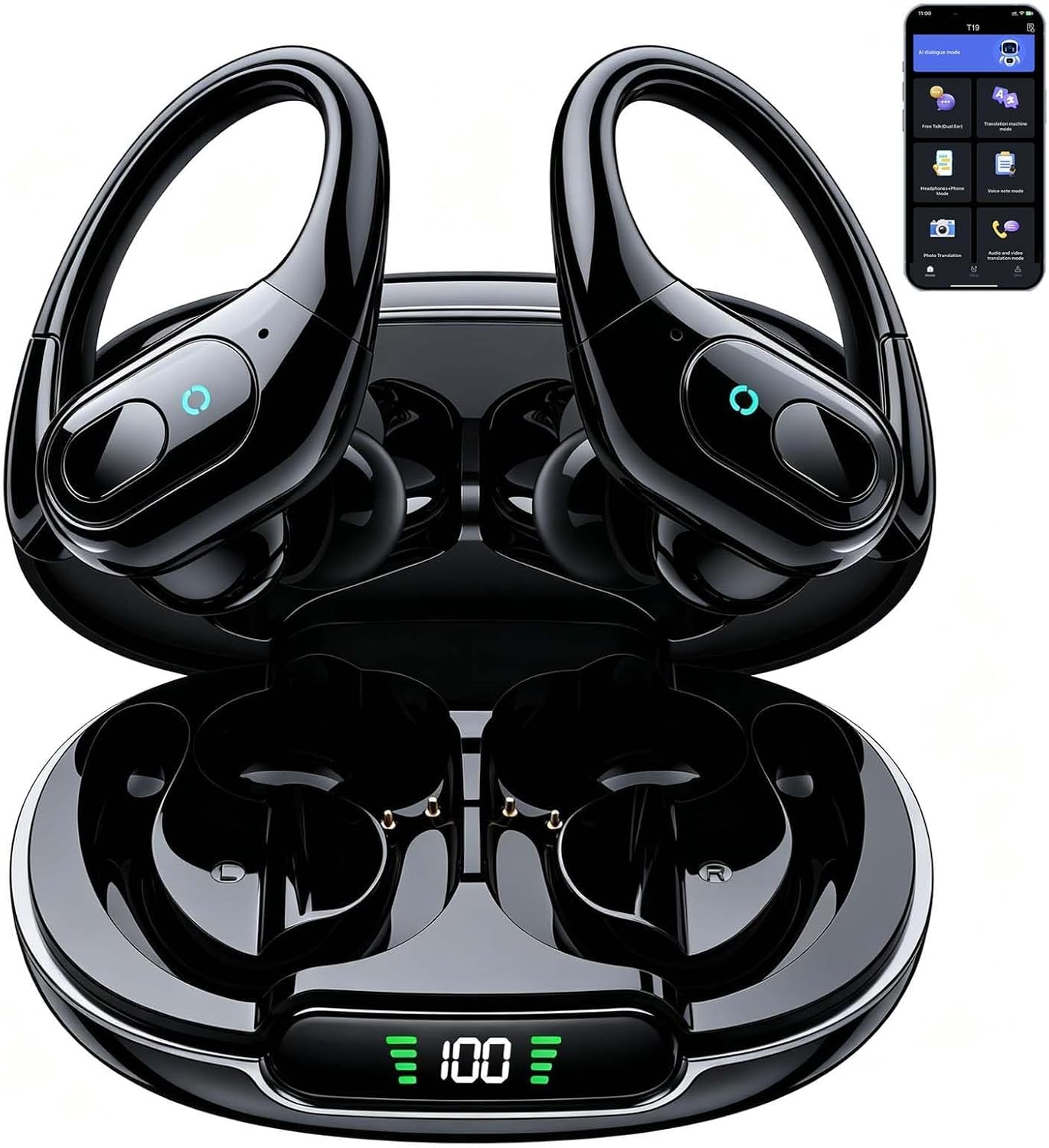
1. Active Noise Cancelling Headphones: Our noise cancelling earbuds can effectively block out external disturbances, reducing ambient noise by up to 45dB. Built-in high-sensitivity microphones ensure crystal-clear call quality, minimizing interference.Whether you're on a bustling subway, a noisy street, or in a crowded office, you'll always enjoy your music or calls without any distractions. Immerse yourself in a world of pure audio bliss with our wireless noise cancelling headphones.
2. Long Battery Life: Each noise cancelling ear bud can play for 8H per a full charge. Combined with the case, when using two ear buds together,you can enjoy 48H playback.When using one earbud each time, you can enjoy up to 90h playback. Noise canceling headphones come with a compact charging case,which can be charged by type-C charging cable. The digital battery display on the case allows you to easily check the remaining power of the case and noise cancelling wireless earbud charging status.
3. Comfort Fit: Our noise cancelling bluetooth headphones are engineered for ultimate comfort during workout and running, featuring flexible and soft ear hooks that securely stay in place.There are 3 sizes of ear tips (S,M,L) to choose for a customized comfort, ensuring a perfect fit for large and small ears during your exercise routine.The sports earbuds with sweatproof design, making the over-ear wireless earbuds resistant to watersweat splashes and sweat, ideal sport earbuds for fitness,jog.
4.Stable Connection & Wide Compatibility: The noise cancelling wireless earbuds with earhooks feature strong and stable connection within a 30ft range. The improved transmission speed ensures a low-latency listening experience. The sport noise cancellation headphones are compatible with a range of Bluetooth-enabled devices, including smartphones, TV, computers, and laptops. The running earbuds offer both binaural and mono modes, allowing flexible enjoyment with either the left or right earpiece.
5. One Step Pairing & Physical Button Control: The T19 sport headphones feature fast pairing and built-in a hall switch, just open the case to enter a pairing mode with your bluetooth device,enable auto power-on and instant connection with your last device when open the case after the initial pairing. Each noise canceling earbud has a press button to offer a hassle-free control, enabling you to play/pause,adjust volume, manage calls, improving the usability of the noise reduction earbuds.