
−46%

Joysticks
XD2-PA24 Joystick Controllers, Monolever Joystick Controllers, XD2PA24CR Spring Return Momentary Joy Stick, Momentary Joy Stick Switch Replacement
$ 8.36
$ 15.49
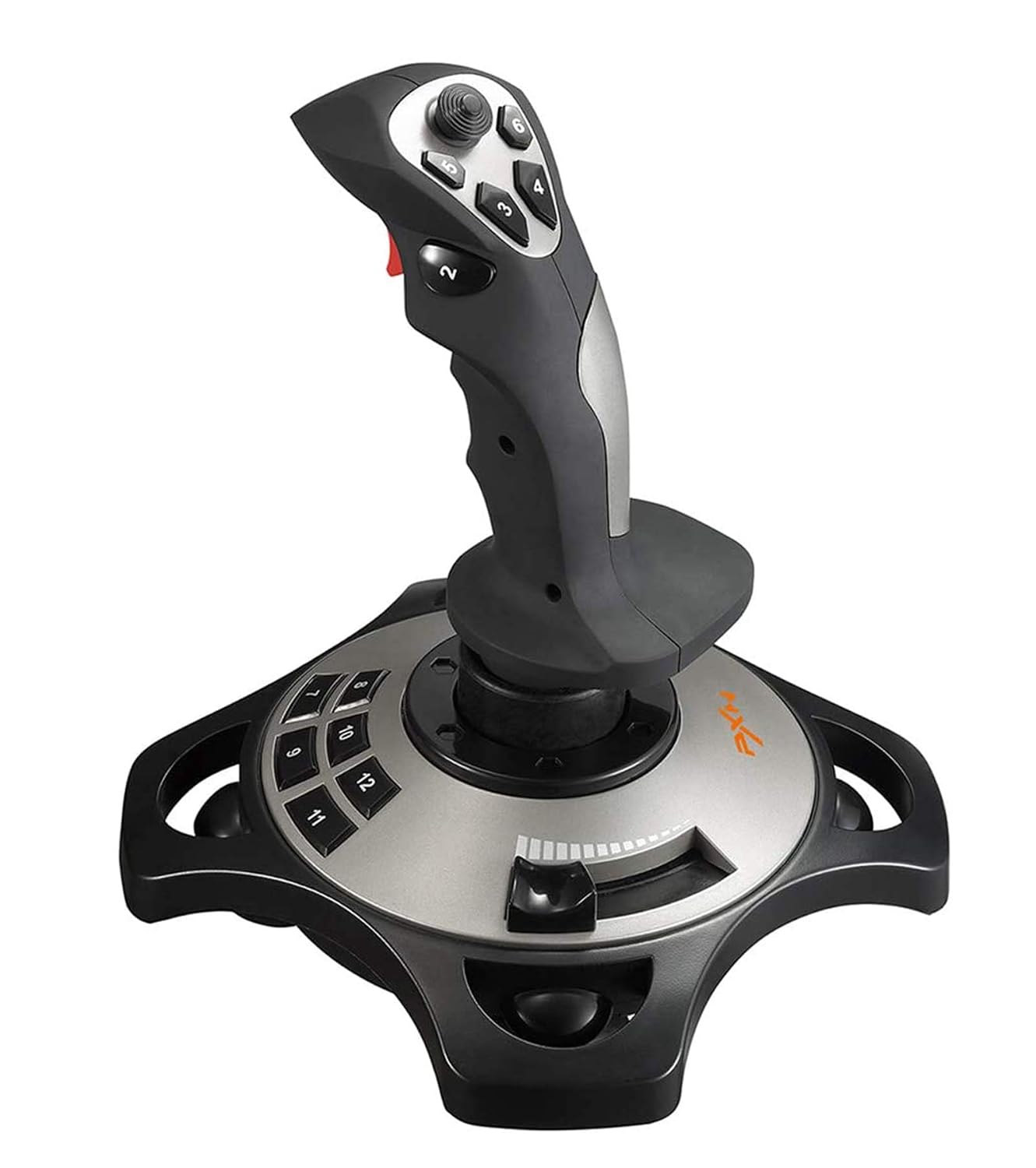 Image unavailable
$ 26.99 49.99
You save
Secure Checkout
Product description 1. PXN 2113 According to the game scene, the full rated vibration engine can produce different vibration effects, compatible with all flying games: "World of Tanks", "World of Warplanes", "War Thunder", "A ssault Horizon", Microsoft Simulator, X Plane 10, etc. (Note): Minecraft is not supported, pitch 8). 2.PXN-2113 is compatible with all flight games, compatible with "World of Tanks", "World of Fighters", "War Thunder", "Ace Combat", "Microsoft Flight Simulator x, "Eage surike the Sky 2", "Defend the Eagle" IL-2", "Battlefield 1942", "Professional fnight simulation 10", "Thunder Wolf", "Seraph", "Air cavalry", "Air conflict", "Age of Sound", "Seraph 2", "Aerial combat ","Air a ssault","Air combat hero" 1. 8-Way joystick,12 Programmable Buttons, 4 Axis controlling,Vibration function, Precise Throttle Control 2. 3D direction dimensional control axis,Rapid fire trigger,Target and accurate fire 3.Ergonomic design,Feel comfortable, Single hand control full function 4.Note about Suction Cups:For the suction cups on the bottom, they can fix firmly when the table is smooth. 5.If wipe the suction cups and your table with a wet towel before sucking, it will be more effective. Attention all customers: 1. Please turn on your PC first and then connect with the joystick.If plug in joystick before starting PC, some computers may not identify this joystick. 2. Vibration Switch is at the bottom,please switch to “ON”.Please set the vibration strength in the driver to 50% or higher. 3. The game must have vibration function and signal transmission of vibration.If no vibration signal,please try another game with vibration function or tell us the name of your game,we will check for you soon. 4. Test the joystick’s vibration function:install the driver,and then please see "Vibration function" in the manual and follow the "Vibration test" to check. 5. No need to install the driver and can play games directly.If you need driver, please contact C-Zone(Contact Seller). Also you can find the download link in "Installation" section of the manual, please check the English manual in colour box. .PXN-2113 set up in Microsoft Flight Simulation Step 1 Launch the game and click“MENU.FLOWBAR_ OPTIONS",select“MENU.OPTIONS CONTROLS". Step 2 Except the keyboard and mouse mode, also have joystick mode in game. Please click“GENERIC USB JOYSTICK" to map the key. (Note: The joystick should be plugged into PC before this setting). Step 3 For function settings, take “INPUT.KEY_ _SWITCH_ CAMERA"as an example, scroll down to select“Select an input", click No.12 button, finally click“VALIDATE”to save(Can be set freely). Step 4 Here is a set of default keys for player. the customer needs to download the driver, log on to the official website of WW.e-pxn.com, Technical Support - Driver Downloads - Joystick Drivers - Flight Joystick Drivers/Mapping Software Updated PXN 2113 PRO Gaming Joystick with Vibration Function - Professional Flight Stick For PC Computer Laptop Compatible with Windows 7/8/10 Specifications: 1. Size: 18.5 x18.5 x22.5 CM 2. Unit Weight: 495g 3. Charging Power: DC 5V 4. Interface: Wired USB 1.For the suction cups on the bottom, they can fix firmly when the table is smooth. 2.If wipe the suction cups and your table with a wet towel before sucking, it will be more effective. Rapid fire trigger,Target and accurate fire Product size: 225mm8.85in /185mm/7.28in /185mm/7.28in 1.Size: 18.5 x18.5 x22.5 CM 2.Unit Weight: 495g 3 Charging Power: DC 5V 4 Interface: Wired USB Package Includes: 1x Joystick with 2.2M USB Cable 1x CD 1x User Manual From the brand PXN-Gaming steering wheel PXN Gaming Racing Wheel With Pedals and Shifter PXN VD4 Bundle F Gaming sim racing wheel Direct Drive Servo Motor Base PXN PXN knows players betterPXN game accessories, you deserve to have PXN PXN knows players better PXN game accessories, you deserve to have PXN pc steering wheel PXN Gaming Accessories PXN Direct Drive Servo Motor pxn gaming steering wheel PXN was founded in 2004 by passionate gamers, delivering pure gaming emotion through premium peripherals. In 19 years, we’ve secured 20+ patents and mastered hardware and software tech, all produced in our 35,000 ㎡ facility, ensuring quality from design to assembly. Serving 6.5 M+ players in 76 countries, PXN offers racing wheels, pedals, controllers, joysticks, headsets, and keyboards for PC, console, and mobile. pxn gaming steering wheel PXN was founded in 2004 by passionate gamers, delivering pure gaming emotion through premium peripherals. In 19 years, we’ve secured 20+ patents and mastered hardware and software tech, all produced in our 35,000 ㎡ facility, ensuring quality from design to assembly. Serving 6.5 M+ players in 76 countries, PXN offers racing wheels, pedals, controllers, joysticks, headsets, and keyboards for PC, console, and mobile. 1.【Vibration Function】According to the game scene,The full rated vibration engine can produce different vibration effects, The vibration switch is located at the bottom of the joystick, please switch to "ON". If the vibration intensity is less than 20%,Please set the vibration strength in the driver to 50% or higher) Compatible with almost flight games:World of Tanks,World of Warplanes,War Thunder,Assault Horizon,Microsoft Flight Simulator,X Plane 10,etc.(Note:Minecraft,Asphalt 8 not supported). 2.【compatibility】:PXN 2113 Flight Simulation Rocker Compatible with PC / Desktop Computer / Notebook, compatible with Windows 7/8/10 system, suitable for Suitable for "Microsoft Flight Simulator 2020", "X-Plane 11," World of Warplanes, "Ace Air Force", "War Thunder", "Ace Combat", "Eagle Strike Sky 2", And "Battlefield 1942", And All PC Flight Simulation Games, [NOTE]: (Do Not Support Mac / Apple Computers / Apple Device / PS3 / PS4 / Xbox One / PS5 / NINTENDO SWITCH. 3. 【Connection Question】Please open the computer first, then connect the PXN-2113 joystick, plug and play, no need to install the driver. If the device does not work, please download the PXN2113 driver, please visit the E-PXN official website: Home - Support - Tool -PXN JOYSITCK SOFWARE, download and install driver, after connecting, please enter the game to make the game interface settings and mode selection if you There is any "connection problem", please give c-zone mail, thank you 4.【Multifunctional Design】 You can quickly control, direct bitter direction, to achieve the left, right upper four directions and 45 degrees, convenient for the conversion angle of the game, the battle is a look, four axes (X / Y / RZ axis) + accelerate Valve + 12 programmable buttons + eight-way cover, integrated vibration motor, motivation experience during the game, these functional configuration allows you to enjoy the happiness of the game. 5. 【Enjoy it】 PXN-2113 flight controller manipulate swing chasing military machine, successfully blocking, aiming, pulling trigger, shooting is as simple, download PXN-2113 driver, controller software supports keyboard button setting, dead zone Adjustment, button mapping, axial map, etc., etc., according to the game needs to create your personal customization, the flight controller design is ergonomic, and it will not feel tired for a long time.
Joysticks
Joysticks
Joysticks
Joysticks