Product details
Product description
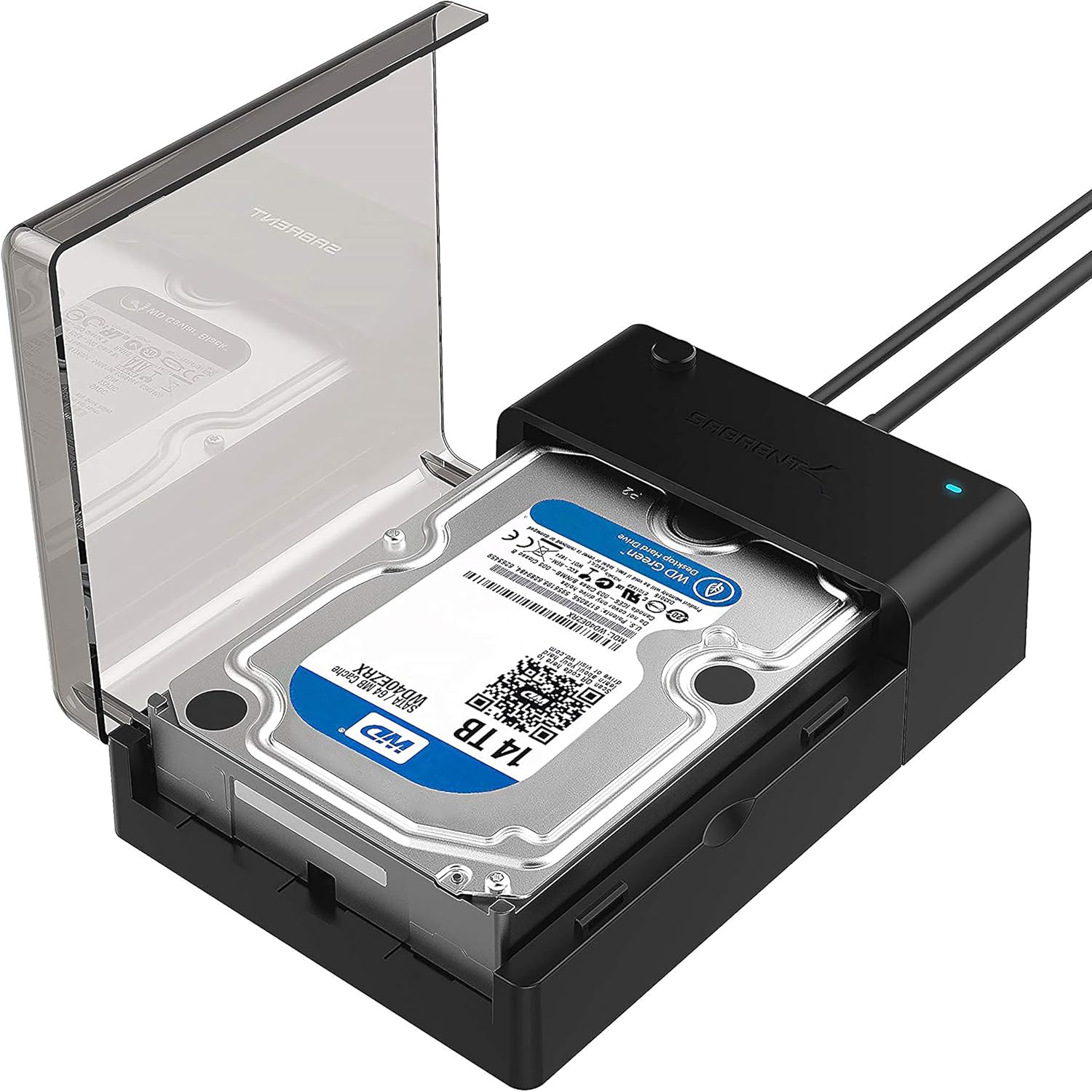
The SABRENT EC DFLT SATA Lay Flat Docking Station supports the direct insertion of Desktop 2.5"/3.5" SATA Hard Drives. It is a caseless solution that makes swapping hard drives easier than ever before. Plus, now you can take advantage of the lightening speed of USB 3.0 to quickly transfer files up to 5 Gbps!
Features:
Supports Standard Desktop 2.5"/3.5" SATA Hard Drives. .
On/Off power switch.
LED light indicates Power and Activity status.
Hot swappable, plug and play, no drivers needed.
Reverse compatible with USB 1.1 & USB 2.0.
Transfer Rates Up to 5 Gbps w/USB 3.0
Transfer Rates Up to 480 Mbps w/USB 2.0
System requirements:
Available USB 3.0 for high speed data transfer
Windows 10 / 11 (32-bit and 64-bit), macOS (current versions), Linux
Package Contents:
SABRENT EC DFLT Lay Flat Docking
Power Supply
USB 3.0 cable
User Manual
Frequently Asked Questions
Q: What types of drives are compatible with this docking station? A: This docking station supports standard 2.5-inch and 3.5-inch SATA I/II/III hard disk drives (HDDs) and solid-state drives (SSDs). Non-SATA drives are not supported.
Q: What is the maximum drive capacity supported? A: This dock supports SATA drives up to 22TB, provided your operating system also supports large-capacity volumes. Drives over 2TB typically require GPT partitioning.
Q: My 3.5-inch drive is not spinning up. What should I check? A: The included 12V/2A power adapter is required for operating 3.5-inch hard drives. Ensure the adapter is connected, the dock is switched on, and the LED power indicator is lit.
Q: The drive is connected but does not appear on my computer. A: Check that the drive is fully inserted and powered. New drives may need to be initialized in your system’s disk management utility. Drives from encrypted enclosures or using self-encryption may require reformatting.
Q: Is any software included for cloning or backups? A: A free download of Acronis True Image for Sabrent is available for data backup and cloning tasks. Please visit sabrent.com to download and activate the software.
Q: What operating systems are compatible? A: This dock is compatible with Windows (7 and newer), macOS, and Linux. No driver installation is required for supported operating systems.
Q: What is included in the package? A: The box includes the docking station, a USB 3.0 cable, a 12V/2A power adapter, and a user manual. Please contact Sabrent support if anything is missing or if further assistance is needed.
From the brand
Power you can hear, feel & see
BLOWZER. Endless possibilities
Sabrent is a leading provider of innovative consumer electronics. We are committed to designing and developing products that provide the utmost quality, dependability, and value. Sabrent strives for excellence with each product we develop by providing cutting-edge features at affordable prices. Our company thrives on creativity, innovation, honesty, and integrity in all aspects of our business operations.
Sabrent is a leading provider of innovative consumer electronics.
We are committed to designing and developing products that provide the utmost quality, dependability, and value.
Sabrent strives for excellence with each product we develop by providing cutting-edge features at affordable prices.
Our company thrives on creativity, innovation, honesty, and integrity in all aspects of our business operations.
SATA DRIVES ONLY — 2.5in & 3.5in: Works with SATA I/II/III hard drives and SSDs. Does NOT support IDE/PATA, M.2 NVMe, M.2 SATA, SAS, or drives already in a USB enclosure. Check your drive's connector before ordering — a bare SATA drive has a wide flat L-shaped edge connector, not a ribbon cable or a small M.2 gold-finger card.
USB TYPE-A HOST CABLE — NOT A USB-C PORT: The included host cable ends in USB Type-A and plugs into a USB 3.0 Type-A port. If your computer has only USB-C ports, you will need a USB-C to USB-A adapter, which is not included. For stable operation plug directly into the computer — USB hubs and USB 2.0 ports may cause intermittent disconnections.
REAL-WORLD SPEED, NOT INTERFACE MATH: USB 3.0 with UASP support (UASP-capable host required). Typical mechanical HDD transfer speeds are 100-160 MB/s, which is the drive's own limit, not the port's; SSD speeds vary up to the USB interface maximum. Backward compatible with USB 2.0 and USB 1.1.
12V POWER ADAPTER INCLUDED — REQUIRED FOR 3.5in DRIVES: A 12V/2A AC power adapter is in the box and a wall outlet is needed. 3.5in HDDs cannot run on USB power alone — without the adapter the drive will fail to spin up or drop out during use. 2.5in drives are generally bus-powered, but the adapter is recommended for stability.
PLUG AND PLAY, TOOL-FREE, HOT-SWAP: No drivers on Windows 10/11, macOS, or Linux. Lay-flat bay accepts a bare drive without tools, swaps without rebooting, and an LED shows power and activity. Note: S.M.A.R.T. diagnostics are not passed through the USB bridge, and on macOS a drive may need remounting after sleep. Drive not included.