Product details
Product description
Hard Drive Reader Makes it very easy to access hard drives out of a computer
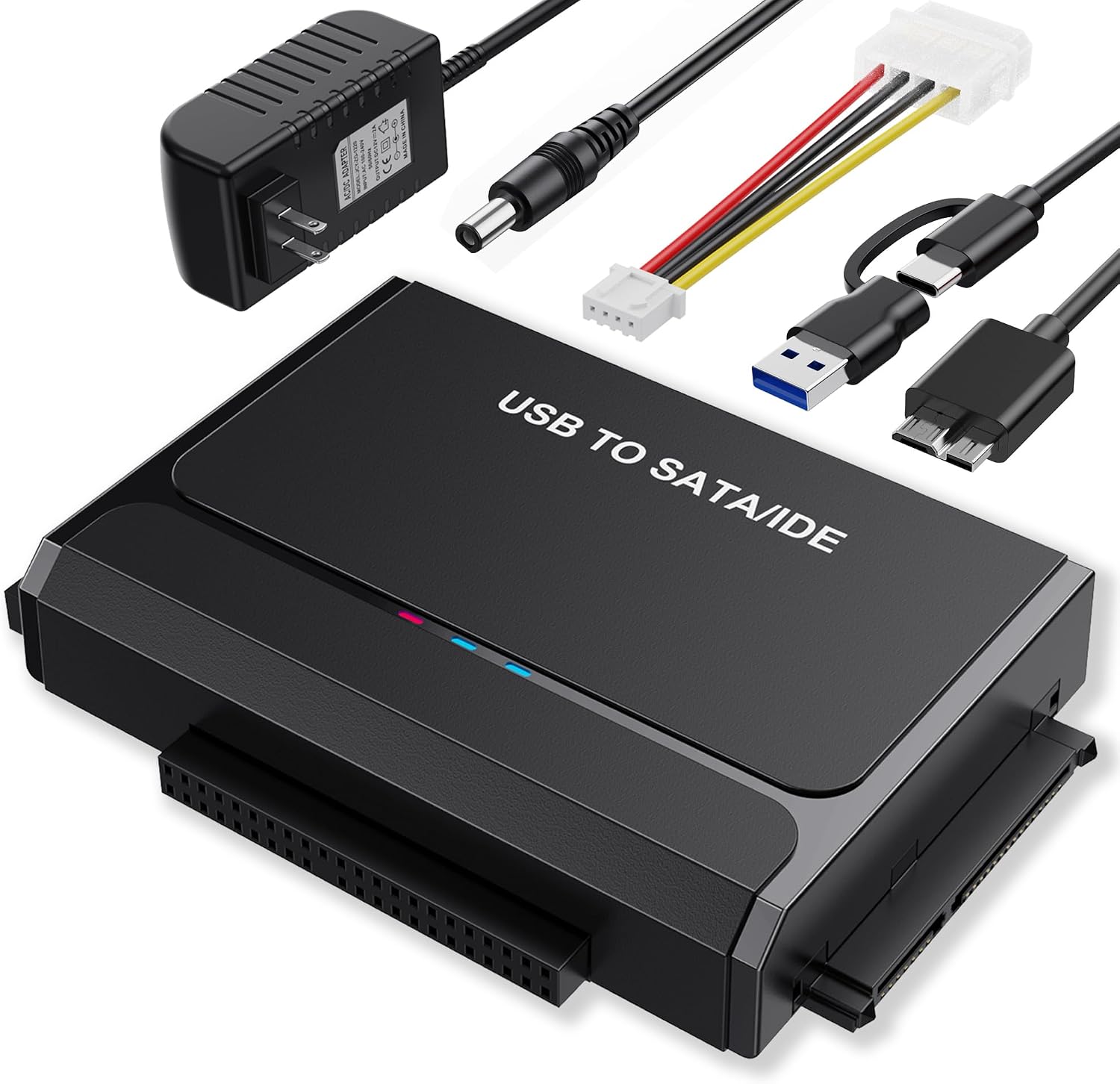
Whether it's precious personal photos or work files, don't let them damage along with your old computer. This USB to IDE SATA adapter lets you easily access all the data on your old hard drive in just one simple step. It support USB 3.0&Type-C for fast data transfer, including a 12V power adapter
Designed For Multiple 2.5"/3,5" HDD/SSD up to 6TB
This USB 3.0 to SATA IDE Adapter has built in connectors for both 2.5in and 3.5in SATA hard drives (HDDs) and SATA solid state drives (SSDs) and IDE hard drives
Supports data transfer rates up to 5Gbps
Featuring a USB-C interface compliant with USB 3.2 Gen 1, delivers fast data transfer speeds of up to 5Gbps. The included USB-C to USB-A combo cable ensures broad compatibility with both newer and older computers
Stable electricity with a 12V 2A power adapter
Included with the adapter is a 12V 2A power supply and a 4-pin cable specifically designed for 3.5" IDE drives, making it easy to connect and power a variety of storage devices. This versatility allows for seamless integration of both SATA and IDE technologies in your setup.
3.5" drives require the power supply whereas 2.5" can be powered entirely of USB
Easily connect and access a wide range of hard drives with this USB to SATA/IDE adapter. Designed for convenience and flexibility, it supports both modern SATA and legacy IDE devices, making it an ideal solution for data transfer, backup, and drive testing
Wide Compatibility
USB-C&USB-A combo cable for different devices
This ide hard drive converter equipped with a USB C to USB C cable with an attached USB A adapter.that plugs into the USB port to match your laptop and is not limited by the computer model
USB-C interface compliant with the USB 3.2 Gen 1 standard
Packaging
1× USB 3.0 to IDE+SATA Adapter;
1× USB-A&C Connector data cable 3.0;
1× 4PIN power cable;
1× 12V 2A Power Adapter ;
1× User guide
Why My Hard Drive Not Showing Up or Detected in Computer with the adapter
Potential Reasons & Troubleshooting:
1) New Drive Initialization: If you are using a brand-new SSD or HDD, you must initialize it first, then create a new partition and format it.
2) Please confirm whether the hard drive itself is still functional and undamaged.
3) If you are using an Mac system, ensure the hard drive is formatted in a file system that macOS can read and write (such as exFAT or APFS).
4) Incorrect Hard Drive Type: This adapter does not support SAS or SCSI hard drives.
5) Damaged USB Port: Try plugging the cable into a different port.
6) External Power Required (for 3.5" Drives): Important: 3.5-inch hard drives require an external power adapter to function
7) LED Indicator Status: The LED indicator light will only turn on after both the hard drive is securely connected
8) USB Port Preference: If you are using a desktop computer, please use the rear USB ports on the back of the computer chassis for a more stable power supply
9) Dual IDE Restriction: Please note that two IDE drives cannot be used simultaneously
Support SATA and IDE Drives : The external hard drive reader supports 3.5" and 2.5" IDE/SATA drives, It features a SATA III connector supporting up to 6 TB, and dual-head IDE connectors (40pin and 44pin) for various drives, You can quickly transfer, backup, data files from old legacy drives
5Gbps High-Speed Transfer Rates: When connected to a USB 3.0 port, IDE/SATA to USB 3.0 Adapter lets you access files in blazing speed up to 5Gbps. Reduce transfer time by up to 3 times when compared to USB 2.0 transfer rates.*Performance may vary based on user's hardware and system configuration
Stable 12V 2A Adapter Included: The hard drive adapter runs 3.5 drive on the supplied power adapter, while 2.5" laptop drives run solely on USB bus power, Individual ON/ OFF switch build in the SATA adapter for hard drive protection
Wide Compatible, Plug & Play: No drivers required, A ide to usb adapter lets you plug an internal hard drive (HDD) or solid-state drive (SSD) into your computer via USB without installing it inside a PC case; hot-swappable design for quick access to drives on Windows, macOS, and Linux
New or Blank Drive Need Setup First: A drive that has never been formatted will not appear until you initialize it in Windows Disk Management or macOS Disk Utility, Please confirm whether your product is compatible before purchasing our hard drive recovery device