
−46%
Gamepads & Standard Controllers
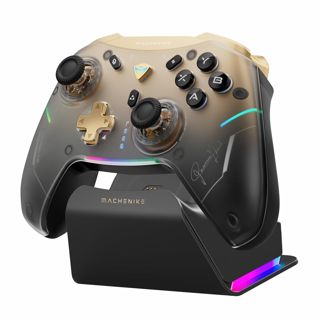
Machenike G5Pro Max Wireless Controller, 1000Hz, RGB, Charging Dock
$ 40.49
$ 74.99
 Image unavailable
$ 43.19 79.99
You save
Secure Checkout
Product description Can it play on PS5/Xbox Series console? Sure, but you need to purchase an additional converter Can it play on PS5/Xbox Series console? Sure, but you need to purchase an additional converter How to perform connection settings? You can press ‘start’ while inserting the keyboard into the PC,Or press and hold start+x+y for five seconds while inserting the keyboard to start the application. Then visit 192.168 . 7.1 Configure in a web browser How to perform connection settings? You can press ‘start’ while inserting the keyboard into the PC,Or press and hold start+x+y for five seconds while inserting the keyboard to start the application. Then visit 192.168 . 7.1 Configure in a web browser Unable to connect, how to upgrade version from 0.7.5 to 0.7.7? You can go to huate42.com Official website to get help Unable to connect, how to upgrade version from 0.7.5 to 0.7.7? You can go to huate42.com Official website to get help Why does my controller stop responding after a while on PS4 or PS5? PS4 and PS5 consoles use authentication to ensure only authorized controllers are used. Without this, controllers face an 8-minute timeout. When using a PS4 controller in PC mode, no timeout occurs, but Xinput is recommended for best compatibility. Why does my controller stop responding after a while on PS4 or PS5? PS4 and PS5 consoles use authentication to ensure only authorized controllers are used. Without this, controllers face an 8-minute timeout. When using a PS4 controller in PC mode, no timeout occurs, but Xinput is recommended for best compatibility. How do I avoid the 8-MINUTE timeout? The GP2040-CE firmware enables file uploads for device authentication via the PS4 Mode add-on, resolving the timeout issue. With an OLED display, the input mode switches from PS4 to PS4:AS upon successful authentication with the PS4/PS5 console. How do I avoid the 8-MINUTE timeout? The GP2040-CE firmware enables file uploads for device authentication via the PS4 Mode add-on, resolving the timeout issue. With an OLED display, the input mode switches from PS4 to PS4:AS upon successful authentication with the PS4/PS5 console. From the brand Sehawei Sehawei offers gaming enthusiasts a range of premium peripherals and accessories to elevate their gaming experience and enjoyment. T Series Arcade Controller Hot Sale Series!!! Hot Sale!!! System Compatibility:Our Arcade keyboard suitable for Windows 10 or above / Steam Deck/Ps3/Ps4/Switch/Raspberry Pi(Lakka, RetroPie, Recalbox, Batocera)/MiSTer/Android, Linux, iPadOS, macOS, Windows (Keyboard mode only)Attention: Regarding the connection of PS4/PS5, please refer to the official website or manual to set it up Metal Texture Higher quality:This is an all metal Arcade keyboard,Adopting CNC Aluminum Alloy.Anodizing Process ultra-thin,not bulky at all,compact and easy to carry,featuring low axis switches.Featuring a cool appearance with RGB mode.Perfect for fighting games,worth having! Ultra Low 1ms Delay:Our M13 keyboard is made of 40nm process node manufacturing, low dynamic power consumption, and low leakage,1ms delay, no frame leakage rate above 95%,Supports firmware updates Custom RGB Design:This is a transparent acrylic material with RGB lighting effect, an enlarged style arcade keyboard with 13 buttons, providing a comfortable feeling and allowing you to enjoy fighting games. Buyers can create their own skins to make the controller look cooler and more personalized Product Function: 5 Controller Modes-X-input mode/Switch mode/PS3 / D-input mode/PS4 mode/Keyboard mode.With Multiple SOCD cleaning modes,turbo functions,built-in embedded web configuration,button layout swap,EXT port,M1/M2 Custom keys
Gamepads & Standard Controllers
Gamepads & Standard Controllers
Gamepads & Standard Controllers
Gamepads & Standard Controllers