
−44%
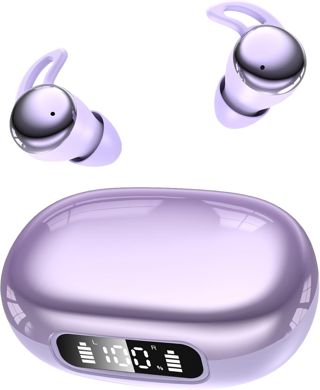
Sleep Earbuds
Sleep Earbuds for Side Sleepers, Noise Cancelling Ear Plugs for Sleeping
$ 39.19
$ 69.98
 Image unavailable
$ 79.39 199.99
You save
Secure Checkout
Product description How do I wear Sleep A30 Special for the best comfort? Choose from the included ear tips (XXS/XS/S/M/L) and ear wings (XS/S/M/L) to find your best fit. Gently twist after inserting for a secure seal. Side sleeper? A softer pillow pairs well with the low-profile design for pressure-free comfort. How do I wear Sleep A30 Special for the best comfort? Choose from the included ear tips (XXS/XS/S/M/L) and ear wings (XS/S/M/L) to find your best fit. Gently twist after inserting for a secure seal. Side sleeper? A softer pillow pairs well with the low-profile design for pressure-free comfort. How long do the earbuds last? In regular use scenario (after sleep it switches to local mode disabling ANC, or Auto-stop audio retains ANC), a single charge can support 8–10 hours of battery life. (Note: Continuous Bluetooth streaming and ANC shorten battery life.) How long do the earbuds last? In regular use scenario (after sleep it switches to local mode disabling ANC, or Auto-stop audio retains ANC), a single charge can support 8–10 hours of battery life. (Note: Continuous Bluetooth streaming and ANC shorten battery life.) How do I use the Dynamic Snore Masking Feature? Open the soundcore app → Snore Masking Settings → enable Dynamic Snore Masking. Keep the charging case within 6 ft of the earbuds and set earbuds to Local mode. The case auto-detects snoring and plays masking sounds. How do I use the Dynamic Snore Masking Feature? Open the soundcore app → Snore Masking Settings → enable Dynamic Snore Masking. Keep the charging case within 6 ft of the earbuds and set earbuds to Local mode. The case auto-detects snoring and plays masking sounds. How do I use the tap controls on the Sleep A30 Special? Left Earbud: Double-tap to switch between Bluetooth/Local modes; Triple-tap to decrease volume. Right Earbud: Double-tap to turn ANC on/off; Triple-tap to increase volume. Please tap the earbud firmly. You can customize or disable taps in the app. How do I use the tap controls on the Sleep A30 Special? Left Earbud: Double-tap to switch between Bluetooth/Local modes; Triple-tap to decrease volume. Right Earbud: Double-tap to turn ANC on/off; Triple-tap to increase volume. Please tap the earbud firmly. You can customize or disable taps in the app. How do I clean Sleep A30 Special, and why does it matter? Regular cleaning keeps sound and charging reliable. A quick weekly clean takes under a minute. Clean with a cotton swab dampened with rubbing alcohol: ear tips, metal mesh filter, mic opening, charging contacts, and charging pogopins. How do I clean Sleep A30 Special, and why does it matter? Regular cleaning keeps sound and charging reliable. A quick weekly clean takes under a minute. Clean with a cotton swab dampened with rubbing alcohol: ear tips, metal mesh filter, mic opening, charging contacts, and charging pogopins. From the brand Sleep A30 Special Block Out Snoring and Disruptions: Sleep peacefully with our Triple Noise-Reduction System. Combining Active Noise Cancelling (ANC), passive isolation, and smart snore-masking technology, these earbuds effectively drown out snoring partners, traffic noise, and ambient humming to create your personal quiet zone. Barely-There Fit for Side Sleepers: Wake up without ear pain. At just 3 g each, these ultra-compact, soft silicone earbuds feature a 3D ergonomic design that sits flush in your ear—minimizing pressure and delivering ultimate comfort, even if you sleep on your side all night. Sleep Stories to Calm Your Mind: Enjoy a curated selection of premium Sleep Stories from Calm. You can also explore a diverse sound library, including AI Brainwave Audio and white noise, to match your preferences. Uninterrupted All-Night Battery: Provides 8-10 hours of playtime per charge and up to 5 nights of use with the charging case. Flexible playback options provide 6 - 16 hours of playback, enabling convenient use overnight or during naps. Smart Sleep Tracking and Insights: Discover how you sleep. The companion app tracks your sleep duration, sleep positions, and even snoring patterns to generate a personalized daily report. Use these easy-to-understand insights to build healthier sleep habits and wake up refreshed. soundcore App Support: Download the soundcore app for software updates and access to available features. Personalize your sleep journey with a wide variety of soothing sleep sounds provided in the audio library, and enjoy a quieter night with adjustable ANC settings and the Dynamic Snore Masking feature. OTA firmware updates help keep your earbuds updated.
Sleep Earbuds
Sleep Earbuds
Sleep Earbuds
Sleep Earbuds