
−73%
Racing Wheels
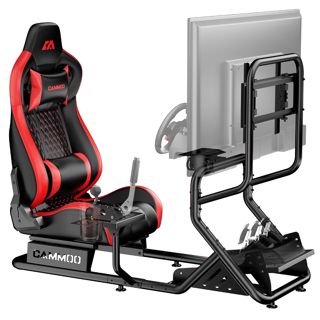
CAMMOO High Compatible Sim Racing Cockpit with Monitor Mount Fits Handbrake
$ 84.90
$ 314.99
 Image unavailable
$ 43.19 79.99
You save
Secure Checkout
Product description Programmable Programmable buttons to suit all driving styles and 3 sensitivity modes, tailord to the type of track Programmable Programmable buttons to suit all driving styles and 3 sensitivity modes, tailord to the type of track Sequential gearshifter Sequential gearshift for total immersion Sequential gearshifter Sequential gearshift for total immersion Ergonomics & Precision Compact, contoured design for driving comfort and an optimal grip Ergonomics & Precision Compact, contoured design for driving comfort and an optimal grip Drive like a Pro Steering wheel paddles for smooth and quick shifting Drive like a Pro Steering wheel paddles for smooth and quick shifting Sporty & Sleek Design Lines inspired by racing wheels: the GS550 looks like a true competition wheel Sporty & Sleek Design Lines inspired by racing wheels: the GS550 looks like a true competition wheel Pedal Set Accelerator and brake pedals Pedal Set Accelerator and brake pedals How to connect the steering wheel to a PS4 or Xbox ? Leave your console turned off > Plug your steering wheel into the console's USB port and the controller's micro-USB port > Turn on your console using the Power button > Press the “Home” button on the steering wheel How to connect the steering wheel to a PS4 or Xbox ? Leave your console turned off > Plug your steering wheel into the console's USB port and the controller's micro-USB port > Turn on your console using the Power button > Press the “Home” button on the steering wheel How to connect the steering wheel to a Nintendo Switch or Switch 2 ? In the console settings, go to the “Controllers and Sensors” menu > enable the “Wired connection to the Pro Controller” option > Plug the steering wheel into the USB port on the console dock > Press the Home button on the steering wheel How to connect the steering wheel to a Nintendo Switch or Switch 2 ? In the console settings, go to the “Controllers and Sensors” menu > enable the “Wired connection to the Pro Controller” option > Plug the steering wheel into the USB port on the console dock > Press the Home button on the steering wheel How can I get help or contact technical support ? Visit our website, where you can find manuals and helpful files on the corresponding product page under the “Manuals and Instructions” tab, or use our chatbot to open a support ticket; you’ll receive a response within 48 hours How can I get help or contact technical support ? Visit our website, where you can find manuals and helpful files on the corresponding product page under the “Manuals and Instructions” tab, or use our chatbot to open a support ticket; you’ll receive a response within 48 hours Can I use an unofficial controller to connect the steering wheel ? The steering wheel works ONLY with an official controller. Make sure the controller is turned off during the connection procedure Can I use an unofficial controller to connect the steering wheel ? The steering wheel works ONLY with an official controller. Make sure the controller is turned off during the connection procedure Which games is the Superdrive GS550 compatible with ? The Superdrive GS550 steering wheel is compatible with most simulation and arcade games, such as Farming Simulator, Forza Horizon, Gran Turismo, Mario Kart, and many others. Please note that some games require configuration. Which games is the Superdrive GS550 compatible with ? The Superdrive GS550 steering wheel is compatible with most simulation and arcade games, such as Farming Simulator, Forza Horizon, Gran Turismo, Mario Kart, and many others. Please note that some games require configuration. How to connect the Superdrive GS550 to PS4, Xbox & Switch / Switch 2 Superdrive 220RS connection procedure for PS4, Xbox Series & One: 1) Leave yous console turned off.2) Plug the sttering wheel into the PS4 or Xbox USB port and into the controller USB port. 3) Turn on the console using the power button. 4) Once the console is on, Press the racing wheel Home button MULTI-COMPATIBLE GAMING STEERING WHEEL: PS4, Switch 2, Switch, Xbox Series X/S, Xbox One, and PC. The steering wheel is not Plug & Play and must be configured. To do so, follow the connection instructions specific to each console (user manual included). An official controller must be connected for the wheel to function properly. Suitable for most racing games: GTA, Gran Turismo, Forza, Dirt, WRC, Farming Simulator, etc. This wheel is not compatible with PS5 IMMERSIVE DRIVING EXPERIENCE: comes with analog pedals (accelerator and brake), 10-inch wheel diameter, 270° rotation angle, steering wheel paddles, and sequential gear lever for smooth and fast gear changes. Vibration motor and programmable buttons to suit all driving styles: 3 sensitivity modes depending on the type of circuit PROGRAMMABLE & COMPATIBLE WITH RACING GAMES: The Superdrive GS550 racing wheel is fully programmable: buttons, pedals, paddles... and is compatible with most racing games on PS4, Xbox, and PC: GTA, Gran Turismo 7, Forza Motorsport 7, Forza Horizon 5, Project Cars 2, F1 2020, Need for Speed, Dirt, WRC, Grid, and more FINISH AND STABILITY: Ergonomic structure made of sturdy ABS with micro-perforated faux leather grip coating for excellent handling and improved comfort during long gaming sessions. For added stability, the steering wheel features a suction cup mounting system that fits most smooth surfaces. WARRANTY & AFTER-SALES SERVICE: The Superdrive steering wheel comes with a 2-year manufacturer's warranty. Online support is available on the Subsonic website to answer your questions. Updates are also available in our FAQ section
Racing Wheels
Racing Wheels
Racing Wheels
Racing Wheels