
−46%

Joysticks
XD2-PA24 Joystick Controllers, Monolever Joystick Controllers, XD2PA24CR Spring Return Momentary Joy Stick, Momentary Joy Stick Switch Replacement
$ 8.36
$ 15.49
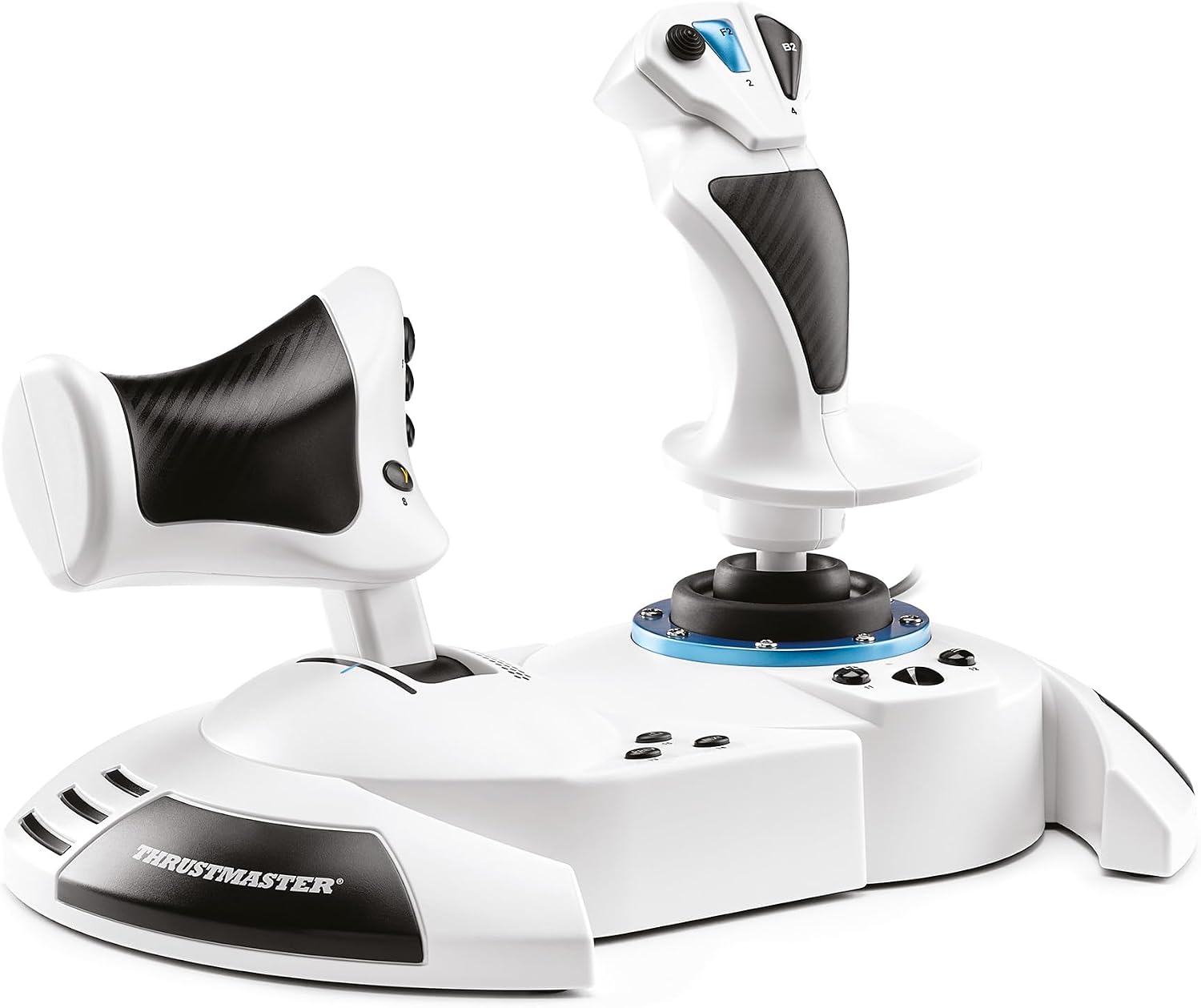 Image unavailable
$ 76.44 134.93
You save
Secure Checkout
From the manufacturer AWAKEN YOUR INNER PILOT Start your flight simulation adventure with the T.Flight Hotas One Microsoft Flight Simulator Edition, the immersive, complete and precise plug-and-play equipment you need to fly all types of aircraft. Connect it to your Xbox Series X|S console or your PC to play Microsoft Flight Simulator 2024. OFFICIAL MICROSOFT FLIGHT SIMULATOR LICENSE T.Flight Hotas One Microsoft Flight Simulator Edition is the perfect all-in-one flight equipment for beginners who want to progress and experience their first full and immersive flying experience in Microsoft Flight Simulator 2024. COMPLETE FLIGHT EQUIPMENT It’s time to feel real sensations like never before with T.Flight Hotas One Microsoft Flight Simulator Edition, the perfect equipment to progress in an immersive flying experience, thanks to its joystick and throttle with a total of 14 buttons, 1 rapid trigger and 1 multi-directional hat switch. DETACHABLE THROTTLE Adapt to your gaming environment thanks to the detachable throttle and the weighted base of Flight Hotas One Microsoft Flight Simulator Edition. Chose to detach the joystick from its throttle to recreate real flying sensations or remain it attached for greater stability and space savings. DUAL RUDDER SYSTEM According to your preferences, the rudder function (rotate the aircraft around its vertical axis) of T.Flight Hotas One Microsoft Flight Simulator Edition can be used with the rudder (Z axis of the joystick) for better control or using the progressive tilting lever for more realism. ADAPTED TO ALL TYPES OF FLIGHTS T.Flight Hotas One Microsoft Flight Simulator Edition allows to fly in optimal comfort in different flight sessions thanks to the ergonomic configuration of its buttons but also the adjustable resistance joystick and its wide hand rest. Q: How can I fix reversed axes on Xbox? A: Go to Settings > Controls in the game. Select T.Flight Hotas One and filter by "Assigned controls". Click the gear icon next to each command, enable the "Invert Axis" option, and save. Q: How can I fix reversed axes on Xbox? A: Go to Settings > Controls in the game. Select T.Flight Hotas One and filter by "Assigned controls". Click the gear icon next to each command, enable the "Invert Axis" option, and save. Q: How can I fix the rudder configuration on PC? A: Download and install the latest drivers from Thrustmaster's official website. Go to Settings > Controls, select T.Flight Hotas One, and search for "Rudder Axis". Enable the automatic detection function, then move the stick (Z axis), to assign it. Q: How can I fix the rudder configuration on PC? A: Download and install the latest drivers from Thrustmaster's official website. Go to Settings > Controls, select T.Flight Hotas One, and search for "Rudder Axis". Enable the automatic detection function, then move the stick (Z axis), to assign it. Q: Do I need to repeat configuration setting steps every time I play? Download and install the latest drivers from Thrustmaster's official website. Go to Settings > Controls, select T.Flight Hotas One, and search for "Rudder Axis". Enable the automatic detection function, then move the stick (Z axis), to assign it. Q: Do I need to repeat configuration setting steps every time I play? Download and install the latest drivers from Thrustmaster's official website. Do I need to repeat configuration setting steps every time I play? A: No, once the settings are applied and saved in a custom profile, they will be preserved for future sessions. Do I need to repeat configuration setting steps every time I play? A: No, once the settings are applied and saved in a custom profile, they will be preserved for future sessions. What should I do if I encounter issues with setting up my device? Please contact Thrustmaster support or check the Microsoft Flight Simulator community forums for additional guidance. What should I do if I encounter issues with setting up my device? Please contact Thrustmaster support or check the Microsoft Flight Simulator community forums for additional guidance. Awaken your inner driver with the T.Flight Hotas One Microsoft Flight Simulator Edition, designed to support you in your discovery of Microsoft Flight Simulator 2024. Get ready for takeoff with the most popular Thrustmaster joystick, now officially licensed Microsoft Flight Simulator. For an immersive flight experience, this complete and accurate equipment will give you realistic sensations during your flight escapes. You can adjust the resistance of the joystick and the position of the throttle and control lever for a complete adaptation to your preferences and comfort. Don't wait another second to go on an adventure: with its plug and play system, the T.Flight Hotas One Microsoft Flight Simulator Edition is immediately recognized on PC and Xbox Series X|S and will allow you to put the full throttle on Microsoft Flight Simulator 2024! OFFICIAL MICROSOFT FLIGHT SIMULATOR LICENSE: Official Microsoft Flight Simulator license for Xbox Series X|S and PC. COMPLETE FLIGHT EQUIPMENT: 10-bit accuracy, with 5 axes (including Z-axis), 14 buttons, 1 quick fire trigger and 1 multi-directional Chinese hat. REMOVABLE GAS CONTROLLER: Place the product on your lap or detach the throttle from the joystick if you are playing on a desk. DUAL SYSTEM HEADLINER: Operate the device sideways with the Z axis of the joystick or with the rocker lever on the detachable throttle. SUITABLE FOR ALL FLIGHTS - Ergonomic button configuration with adjustable joystick resistance for use on all types of devices. ECOSYSTEM: Compatible with Thrustmaster TFRP (sold separately): first rudder with S.M.A.R.T. slide system. for fluid control surfaces.
Joysticks
Joysticks
Joysticks
Joysticks