
−46%
Enclosures
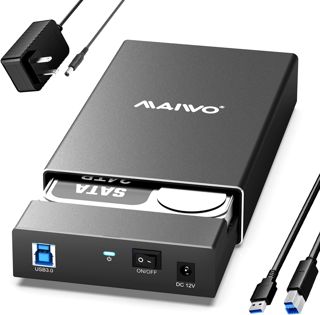
MAIWO 2.5''/3.5'' Hard Drive Enclosure for SATA HDD/SSD with ON/Off Switch
$ 10.25
$ 18.99
 Image unavailable
$ 41.03 75.99
You save
Secure Checkout
From the brand Thunderbolt Storage Series Visit the Store Thunderbolt Storage Series Visit the Store High-Speed Portable Storage Visit the Store High-Speed Portable Storage 20Gbps M.2 SSD Enclosure Visit the Store 20Gbps M.2 SSD Enclosure SATA Enclosure & 3.5" Adapters Visit the Store SATA Enclosure & 3.5" Adapters SATA Enclosures & 2.5" Adapter Visit the Store SATA Enclosures & 2.5" Adapter Product description UGREEN 40Gbps M.2 NVMe Enclosure with Cooling Fan Exclusive Triple Heat Dissipation Mechanism Why can't my computer recognize my SSD? 1. Verify that the product, hard drive, and computer are properly connected and that the hard drive is correctly installed. 2. A new hard drive must be partitioned and formatted for the first time; otherwise, the computer will not recognize the drive letter. 3. Verify that the system supports large-capacity hard drives. 32-bit Windows XP does not support hard drives larger than 2TB. 4. Verify that the hard drive format matches the system's supported format. If not, format the hard drive to a supported format: Windows supports NTFS/exFAT/FAT32, while Linux and macOS support exFAT. 5. Test by connecting the product to another USB port on the computer. For a desktop computer, connect the product to the USB port on the back of the unit. 6. Replace the product cable and test again. 7. Replace the hard drive and test again.8. Test again by connecting the product and hard drive to another computer. Why does the enclosure heat up during using? The enclosure uses an aluminum alloy shell with a PWM turbo cooling fan to help transfer heat from the hard drive to the outside to prevent the internal temperature from heating up. The maximum operating temperature of the enclosure is below 60°C, which is a safe range. Why does the read and write speed of the enclosure decrease after running for a while? The maximum transfer rate of the enclosure can reach 40Gbps. High-speed transfer makes the hard disk heat up. If the temperature is too high, the controller of the enclosure and SSD may activate thermal throttling protection, automatically reducing the transfer speed to protect the hardware from damage. Why does the enclosure only reach 10Gbps on Mac mini M4/M4 Pro? The front two USB 3 ports on Mac mini M4/M4 Pro only support up to 10Gbps. To achieve 40Gbps, please connect the enclosure to the TB4/USB 4 ports on the back of the Mac mini. UGREEN M2 Enclosures 40Gbps M.2 Enclosure 1TB Portable SSD(40Gbps) 80Gbps M.2 Enclosure 40Gbps Dual-Bay Cloner 20Gbps M.2 Enclosure Superior Heat Dissipation, Keeping Cool at All Times: This NVME Enclosure features UGREEN Exclusive Triple Heat Dissipation Mechanism. The pure aluminum alloy casing provides excellent heat conductivity, while the silicone thermal pad absorbs and disperses the heat generated by the hard drive. The high-speed cooling fan accelerates the heat dissipation process, effectively reducing the hard drive temperature and improving its stability and reliability Intelligent Cooling, Peace of Mind in Use: This M.2 SSD Enclosure is equipped with a PWM turbo high-speed fan, which can precisely control the fan speed and automatically adjust it to maintain normal temperatures. This not only protects the hard drive but also extends its lifespan. Additionally, the fan operates at a relatively low noise level, providing you with a comfortable user experience Lightning Fast Transfers, Enjoy Efficient Living: With the built-in ASM2464PD chip, support for UASP acceleration protocol, and equipped with a USB4-compatible Type-C interface, this 40Gbps M.2 NVME SSD Enclosure is compatible with USB4/3.2/3.1/3.0/2.0 & Thunderbolt 3/4. Note:Thunderbolt 4 speeds require Thunderbolt 4 cables and interfaces. Other interfaces can only reach the highest speed of the corresponding interface Widely Compatible, Explore More Possibilities: The 40Gbps Macbook SSD Enclosure is the preferred choice for gamers, video editors, photographers, and office workers. It supports M/B+M key NVMe solid-state drives with a maximum capacity of 4TB. It is compatible with sizes including 2230/2242/2260/2280, and it is suitable for Windows/Mac OS(Mac Mini M4/M5 Pro/M6)/Linux/Android systems (Note: Does not support SSD with heatsink and M.2 PCIE 5.0 SSD) Self-Monitoring, Ensuring Secure and Reliable Backup: The S.M.A.R.T. technology enables timely detection of the hard drive's operational status, while the TRIM command function optimizes the performance of the solid-state drive. The USB4 NVME Enclosure facilitates self-monitoring, ensuring the security and stability of your data transfers. Additionally, the equipped silicone case effectively mitigates the impact on the hard drive enclosure
Enclosures
Enclosures
Enclosures
Enclosures