
−46%

Joysticks
XD2-PA24 Joystick Controllers, Monolever Joystick Controllers, XD2PA24CR Spring Return Momentary Joy Stick, Momentary Joy Stick Switch Replacement
$ 8.36
$ 15.49
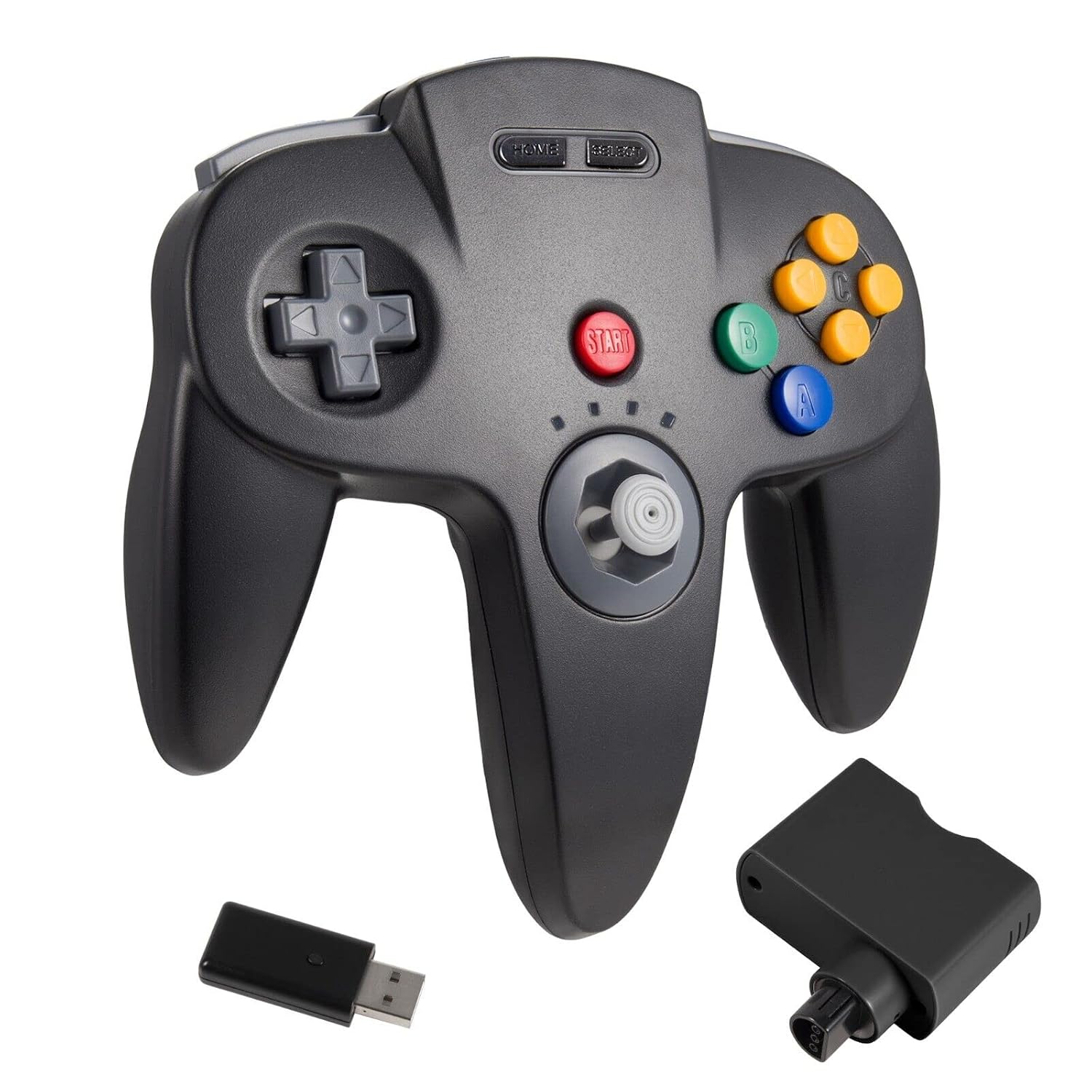 Image unavailable
$ 20.51 37.99
You save
Secure Checkout
Product description Wireless Joystick Controller Compatible with Original N64 system /Switch & Switch 2 & Windows PC Widely Compatibility Use a Wireless N64 receiver(included), mainly works with Nintendo 64 Entertainment System Console. Use a 2.4 GHz Wireless USB receiver(included), it can run Windows PC, Mac and Raspberry PI . Compatible with Nintendo Switch and Switch 2 when connected via USB dongle. Quick charge and advanced wireless connection The 500 mAh built-in lithium battery allows you to enjoy game for over 15 hours without interruption after fully charged The wireless connection supports stable connection within 25 feet that is better than having to sit on floor a foot away from the TV Ergonomic Design Classic N64 style with "M" shape, all the buttons and controls make your hand very comfortable for long periods of game play. Great battery life Wireless USB/N64 connection, build in 3.7V/500mA lithium Ion battery which can work continuously for over 15 hours, and charging time only takes 2-3 hours 2.4GHz Wireless technology 2.4 GHz wireless connection with up to a 25-foot that is better than having to sit on floor a foot away from the TV. Classic N64 style with "M" shape, bring you real old school retro feels Package List 1x Wireless Game Controller 1x User Guide 1x USB Charge Cable 1x N64 Receiver 1x USB Receiver Compatible & Incompatible Compatible with Nintendo 64 console, Switch online(1,2), Windows Pc(Mac Linux ) ,MAC, Raspberry pi ect Incompatible: Not compatible with Xbox 360/ Xbox One/Wii/ Steam Windows & Mac OS System,running windows 98/2000/ ME/XP/Vista/Win 7/8/8.1/10/11 or later,or Mac running OS X,Mac OS X and macOS Q: When the controller didn’t work and connect the switch? A: For Switch, please sets the icon" Pro Controller Wired Communication is ON " in the system settings. Q:Why doesn't the C button of the controller not function when it is connected in the switch? A: When you pairing successfully in the switch, please press and hold“ Start+Left" for 3 seconds, ensure and enter mode C mode, and this C button will have corresponding functions. Q: When pair this controller with switch 2, the buttons do not work and not synced by the device. A: Please Google the updated firmware module patch and update the firmware Notice: 1. When you switching devices, you have to re-pair the controller, please press the “reset”button, then pair the controller step by step as if it were used at the first time 2. When you use it on MAC or window PC device, please download the emulator first before start the games, you can download the emulator “Project64” on PC and “OpenEmu”on MAC How to pair on the switch: 1.Click the menu “System settings “by Switch Joypad , find the icon”Controllers and Sensors” and click the button“ Pro Controller Wired Communication" must be ON status. 2.Plug the USB receiver into USB port of the switch and the red led starts flashing, press and hold the "SYNC" button on the receiver until it fast-blinking. 3. Press the"Reset“ button on the top of the controller , the led on the controller starts flashing. 4. Press the" Start” button, the LED stays lit and the controller is connected. Tips: When you pairing with the switch successfully, if you wan to pause the games, please press the" reset" on the controller for 11 S, the controller will automatically turn off the power. How to pair your N64 device: 1)When you first pair the controller, Plug in the N64 receiver to N64 system console, then press the " reset“ button of the gamepad. 2)Press the START button to wake up the controller, and the light flashes quickly. 3)Finally, please press the button on the receiver for 3S, the red LED will flash rapidly and is always on after the pairing successfully. ⁂ 【Compatibility】Wireless controller for Original Nintendo 64 system and Switch Console, specially designed for Classic N64 old school Online Games On Switch, including N64 and USB receiver. Compatible with various platforms, support Switch /Switch 2/Switch OLED, Nintendo 64 Console, Windows PC/MAC or Raspberry Pi ⁂【Classic Design】ERGONOMIC DESIGN HANDLE, Classic N64 style with "M" shape ,perfectly fit palms, all the buttons and controls make your hand very comfortable for long periods of gaming, enhance your gaming convenience and experience. ⁂【Wireless connection】2.4GHz Wireless technology and wireless range up 25 feets,that is better than having to sit on floor a foot away from the TV. Great battery life, built-in 500mah high-performance lithium batteries and only takes 3 hours to charge and can work for up to 15 hours. ⁂【Precise joystick and motor shock Vibration 】Precise 3D-high quality analog stick, built-in rumble Pak and memory card port. When pairing with the Switch 2 fails, and search or contact seller support for the Google module patch, then update the firmware. ⁂ It is a great choice if you hope to play these classic N64 online games ON switch console. And you can play most of retro N64 games very well, such as Mario Party game,Zelda N64,okémon Snap, Star fox, Smash Bros, Kirby, Glover or any other N64 games in the 90’s. Notice: For Switch, "Pro Controller Wired Communication" must be enabled before pairing. For the PC(USB 2.0 port), you can download the N64 emulator(Such as project 64) 【Satisfaction】Third party controller, 100% brand new & high quality. USB dongle can fast connect by downloading the game emulator in windows system, PC running operating system:Windows 98/2000/ ME/XP/Vista/Win7/8/8.1/11 or later,or Mac running OS X 10.0/Mac OS X or above.
Joysticks
Joysticks
Joysticks
Joysticks